> ## Documentation Index
> Fetch the complete documentation index at: https://docs.runlayer.com/llms.txt
> Use this file to discover all available pages before exploring further.
# Policies
> Manage access control policies for MCP servers
## Managing Access Policies
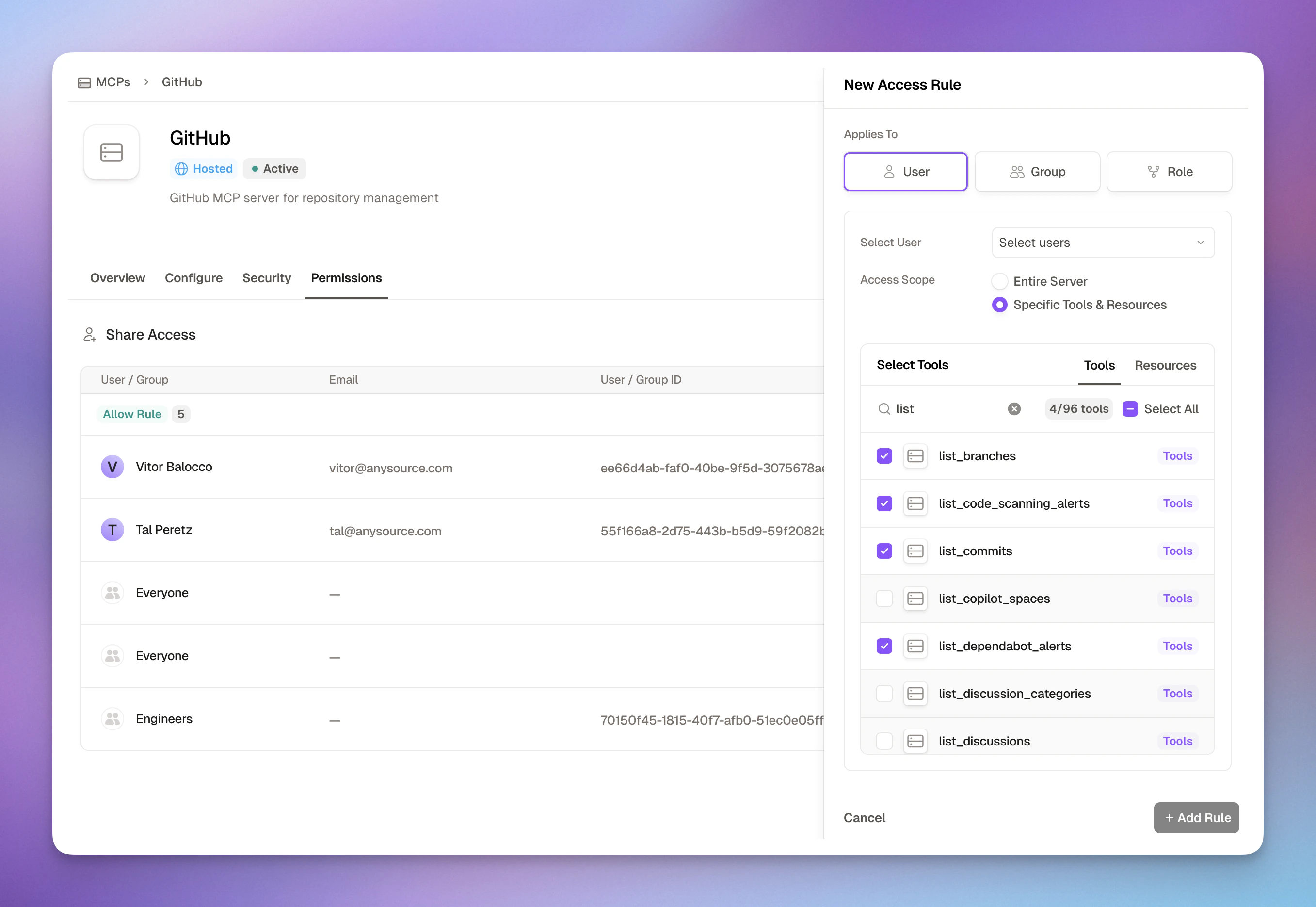 After approving MCPs, you control who can access them through access rules. Runlayer's policy system combines fine-grained permissions with ease of use, achieving both **accuracy** and **least privilege** by default.
***
## How Access Rules Work
Access rules grant permissions to users, groups, roles, or agent accounts for specific MCP servers. Each rule can include **multiple principals** of the same type — for example, several users or several groups in one rule.
**Applies To** (Who gets access):
* **User**: One or more individual employees by email/ID
* **Group**: One or more teams synced from your SSO (Engineering, Marketing, etc.)
* **Role**: One or more job functions or custom roles
* **Agent Account**: One or more machine-to-machine identities (see [Agent Accounts](/platform-agent-accounts))
* **Attributes**: Match users by identity attributes (e.g., department, job title)
* **Everyone**: Wildcard principal that matches all subjects, including users and agent accounts (typically used in global deny policies)
**Access Scope** (What they can access):
* **Entire Server**: Full access to all tools in the MCP
* **Specific Tools & Resources**: Fine-grained selection of individual tools
**Conditions** (Advanced - Optional):
* Add runtime rules based on tool arguments (e.g., restrict SQL queries to specific tables)
* Enforce network restrictions (e.g., corporate IP ranges only)
* Validate OAuth session properties (e.g., require verified accounts)
* Block specific MCP clients
This design ensures you can easily grant appropriate access while maintaining security through least privilege.
Policy conditions evaluate **runtime context** — tool arguments (`payload.*`), request metadata like IP and client, OAuth session state, tool annotations, and session history (`meta.session.*`). They do not perform semantic analysis of what the user is *trying* to accomplish. For intent-level monitoring — detecting when an agent's behavior diverges from the user's intent across a session — see [AgentGuard](/agentguard).
***
## How Runlayer Enforces Least Privilege
Policies are one of several enforcement layers that work together. A request must pass all of them:
1. **Platform roles (FGA)** — control who can use platform features at all, like creating policies or managing connectors. See [Roles & Permissions](/platform-roles).
2. **Access policies (PBAC)** — server-level allow/deny rules and global deny rules, evaluated by the proxy on every tool invocation (this page).
3. **Identity-scoped tokens** — [Agent Accounts](/platform-agent-accounts) authenticate with their own credentials; M2M tokens enforce agent-account policies, and OBO tokens enforce the **intersection** of the agent's and the delegating user's policies.
4. **Runtime conditions** — argument, network, OAuth, annotation, and session-history checks applied at invocation time.
**Example — support agent using Slack:** an admin's Super Admin role lets them create the rule; a server-level rule grants the agent account access to only `list_channels`, `read_messages`, and `search_messages` on the Slack MCP; the agent's OBO token limits it to what the delegating user is also allowed; and a global deny with `meta.tool.annotations.destructiveHint EQUALS true` backstops everything. See also [Agents](/platform-agents) for scoping agent workloads.
***
## Policy Types
Runlayer supports two types of policies:
### Server-Level Policies
Manage access to specific MCP servers. Navigate to **My connectors → \[Server Name] → Permissions** tab.
* **Scope**: One or more specific servers
* **Action**: Allow or Deny
* **Use for**: Granting access, fine-grained tool restrictions
* **Example**: Allow Finance group to use database query tools
### Global Policies
Organization-wide restrictions that apply everywhere. Navigate to **Settings → Policies**.
* **Scope**: All servers, tools, and resources (\*)
* **Action**: Deny only
* **Use for**: IP blocks, client restrictions, compliance requirements
* **Example**: Block all access from outside corporate network
Use global policies for organization-wide security controls, and server-level policies for granting and managing access to specific resources.
***
## Creating Access Rules
Go to the MCP you want to grant access to → **Permissions** tab
Opens the access rule creation dialog
Choose a principal type (**User**, **Group**, **Role**, **Agent Account**, or **Attributes**), then select one or more from the dropdown. A single rule can include multiple principals of the same type.
Choose between:
* **Entire Server**: Grant access to all tools (faster, simpler)
* **Specific Tools & Resources**: Select individual tools (more secure, granular)
Click "Add Rule" to save - takes effect immediately
***
## Access Rule Examples
### Team-Wide Server Access
**Scenario**: Give engineering and devops teams access to the GitHub MCP
```
Applies To: Group "Engineering", Group "DevOps"
Access Scope: Entire Server
Result: All members of both groups can use every tool in the GitHub MCP
```
**When to use:**
* Multiple teams need comprehensive access
* Server tools are all appropriate for the groups
* Simplicity is preferred over granularity
***
### Fine-Grained Tool Access
**Scenario**: Give finance analysts read-only access to the Database MCP
```
Applies To: Group "Finance"
Access Scope: Specific Tools & Resources
Selected Tools:
- list_tables
- query_database
- read_schema
Result: Finance can only query and read, not modify data
```
**When to use:**
* Sensitive MCPs require least privilege
* Only specific tools are needed
* Different roles need different capabilities
This is how admins approve or deny **individual tools inside an already-approved connector**: [connector approval](/platform-approvals) decides whether the server is available at all, then server-level rules with **Specific Tools** scope (allow or deny) control each tool, enforced at invocation time and effective immediately. For a human checkpoint on specific tool calls during agent runs, see [human-in-the-loop approvals](/platform-agents#hitl).
***
### Annotation-Based Access (Read-Only Tools)
**Scenario**: Give data analysts access to all tools, but only allow read-only ones at invocation time
```
Applies To: Group "Data Analysts"
Access Scope: Entire Server
Conditions:
- meta.tool.annotations.readOnlyHint EQUALS true
Result: Data Analysts can see all tools, but can only invoke
tools annotated as read-only
```
**When to use:**
* Restrict access based on tool capabilities (read-only, destructive, etc.)
* Enforce safety boundaries at invocation time
* Works across any server with annotated tools
***
### Individual User Access
**Scenario**: Give a contractor temporary access to specific Slack tools
```
Applies To: User "contractor@company.com"
Access Scope: Specific Tools & Resources
Selected Tools:
- list_channels
- read_messages
- search_messages
Result: Contractor can read but not post or manage Slack
```
**When to use:**
* Individual exceptions needed
* Temporary access for specific users
* Contractors or external collaborators
* Testing new MCPs with a single user first
***
### Conditional Access by Tool Arguments
**Scenario**: Allow finance team to query only sales and finance tables
```
Applies To: Group "Finance"
Access Scope: Specific Tools
Selected Tools: query_sql
Conditions:
- payload.table BEGINS_WITH ["sales_", "finance_"]
Result: Finance can query sales_* and finance_* tables only
```
**When to use:**
* Database access needs table-level restrictions
* File systems need path-based access control
* APIs need parameter validation
* Sensitive data requires fine-grained control
***
### Global Policy: Block External IPs
**Scenario**: Require all users to access MCPs from corporate network
```
Location: Settings → Policies (Global)
Applies To: Everyone
Action: Deny
Scope: All servers, tools, resources (*)
Conditions:
- meta.request.ip NOT_IN_IP_RANGE ["10.0.0.0/8", "172.16.0.0/12"]
Result: Any access from outside corporate IPs is blocked
```
**When to use:**
* Compliance requires network-based access control
* Remote work must use VPN
* Sensitive data needs IP restrictions
* Organization-wide security policy
***
### Restrict Gmail to Internal Recipients Only
**Scenario**: Prevent outgoing Gmail messages to external recipients, allowing only emails sent to your internal domain (e.g., `@runlayer.com`)
```
Location: MCP -> Connectors → Gmail → Permissions tab
Applies To: Group "Everyone" (or specific teams)
Action: Deny
Access Scope: Specific Tools
Selected Tools:
- send_email
- send_draft
Conditions:
- payload.to NOT_ENDS_WITH "@runlayer.com"
Result: Users can only send emails to @runlayer.com addresses;
attempts to email external domains are blocked
```
You can extend this policy to also check `payload.cc` and `payload.bcc` fields using additional condition rules to ensure internal-only communication across all recipient types.
**When to use:**
* Prevent data exfiltration via email in AI agent workflows
* Enforce internal-only communication for sandbox or development environments
* Provide guardrails for agents with Gmail access
* Meet compliance requirements for regulated data
* Test new AI workflows safely before allowing external communication
***
### Block Tools That Accept Sensitive Parameters
**Scenario**: Prevent any tool that requires a `password` parameter from being invoked
```
Location: Settings → Policies (Global)
Applies To: Everyone
Action: Deny
Scope: All servers, tools, resources (*)
Conditions:
- meta.tool.input_schema.required LIST_CONTAINS password
Result: Any tool whose JSON Schema lists "password" as a
required field is blocked at invocation time
```
**When to use:**
* Prevent credential-handling tools from running without approval
* Block tools with dangerous parameter shapes (e.g., `sql`, `command`)
* Works with any `meta.tool.input_schema.*` subfield (e.g., `type`, `required`)
`input_schema` is the tool's JSON Schema object. Use dot-path subfields
like `meta.tool.input_schema.required` with the `list_contains` operator,
or `meta.tool.input_schema.type` with `equals`.
***
### Block Destructive Tools Organization-Wide
**Scenario**: Prevent all users from invoking tools that may delete or overwrite data
```
Location: Settings → Policies (Global)
Applies To: Everyone
Action: Deny
Scope: All servers, tools, resources (*)
Conditions:
- meta.tool.annotations.destructiveHint EQUALS true
Result: Any tool marked as destructive is blocked at invocation time
```
**When to use:**
* Enforce safety boundaries across the organization
* Protect production data from accidental deletion
* Compliance requirements for data preservation
* Gradual rollout (start with deny-all, grant exceptions)
**Where annotations come from:** `readOnlyHint`, `destructiveHint`, `idempotentHint`, and `openWorldHint` are standard MCP tool annotations declared by the MCP server author in each tool's definition. Runlayer reads them from the server's tool listing and exposes them as `meta.tool.annotations.*` at invocation time. An annotation-based policy only matches tools whose server actually declares the annotation — for unannotated or untrusted servers, combine with name-based conditions (e.g., `meta.tool.name REGEX "delete|remove|drop"`) or explicit **Specific Tools** scoping.
***
### Dynamic Value References (`$meta.*` / `$payload.*`)
Condition values can reference runtime context dynamically by prefixing with `$`. This enables policies that compare one context field against another — for example, comparing a tool argument against values recorded earlier in the session.
**Supported prefixes:**
* `$payload.` — Resolves to the current tool call's argument value
* `$meta.` — Resolves to any `meta.*` context field
**Behavior when a reference cannot be resolved:**
* If the referenced path doesn't exist (e.g., the tool argument isn't present), the rule **fails** (does not match) — even for negated operators like `not_equals` or `list_not_contains`. This prevents accidental allows when data is missing.
**Example:**
```
Condition rule:
field: meta.session.payload_values_used.repo
operator: list_not_contains
value: $payload.repo
```
This rule matches when the current `repo` argument has **not** been used earlier in the session.
***
### Session Payload Tracking
Runlayer can track which distinct tool argument values an agent uses during a session. Combined with deny policies and dynamic value references, this enables **session isolation** — once an agent accesses a resource (e.g., a specific repository), it cannot access different ones for the rest of the session.
**How it works:**
1. A deny policy references `$payload.` in its value — this tells Runlayer to track that field
2. On each allowed tool call, the actual argument value is recorded in the session (Redis-backed, set-based)
3. On subsequent calls, `meta.session.payload_values_used.` contains all previously-used distinct values
4. The deny policy evaluates against that list to block divergent values
Only fields referenced by active policies are tracked — there is no overhead for unreferenced arguments. Tracking is set-based (distinct values only, no counts or ordering).
***
### Repository Isolation (Need-to-Know)
**Scenario**: Once an agent accesses a repository, block all other repositories for the rest of the session. Prevents context leakage across repos in shared agent sessions.
```
Location: MCP → [GitHub Server] → Permissions tab
Applies To: Agent Account "Code Agent" (or Everyone)
Action: Deny
Access Scope: Entire Server
Conditions (all rules in one group — AND logic):
- meta.session.payload_values_used.repo LIST_NOT_CONTAINS $payload.repo
- meta.session.payload_values_used.repo LIST_REGEX ".+"
Result: After the first tool call with a "repo" argument, any call
with a different "repo" value is denied
```
**How the two rules work together:**
| Rule | Purpose |
| --------------------------------- | ------------------------------------------------------------------------------ |
| `list_not_contains $payload.repo` | Current repo is not in the set of previously-used repos |
| `list_regex ".+"` | At least one repo has been used before (prevents blocking the very first call) |
Both rules must match (AND) for the deny to activate. On the first call, the second rule fails (no previous values), so the call is allowed and the repo is recorded. On subsequent calls with the *same* repo, the first rule fails (it IS in the list), so the deny doesn't activate. On calls with a *different* repo, both rules match and the call is denied.
Edit the field name (`repo`) to match your MCP server's argument name — common alternatives include `repository`, `project`, or `owner/repo`. The same pattern works for any field: `database`, `account_id`, `workspace`, etc.
***
## Available Operators
Conditions use operators in **snake\_case**. All operators are listed below:
| Category | Operator | Description |
| ------------ | -------------------- | --------------------------------------------------------------------------------------- |
| **Equality** | `equals` | Exact match |
| | `not_equals` | Does not match |
| **String** | `contains` | Value contains substring |
| | `not_contains` | Value does not contain substring |
| | `begins_with` | Value starts with prefix |
| | `not_begins_with` | Value does not start with prefix |
| | `ends_with` | Value ends with suffix |
| | `not_ends_with` | Value does not end with suffix |
| **Regex** | `regex` | Matches a regular expression (RE2 syntax) |
| | `not_regex` | Does not match a regular expression (RE2 syntax) |
| **IP Range** | `ip_range` | IP is within CIDR range(s) |
| | `not_ip_range` | IP is outside CIDR range(s) |
| **List** | `list_equals` | Deep equality between lists (order-sensitive) |
| | `list_not_equals` | Lists are not deeply equal |
| | `list_contains` | List contains value; if rule value is a list, all values must be present (subset check) |
| | `list_not_contains` | List does not contain value; if rule value is a list, none of its values can be present |
| | `list_regex` | List field entry matches regex |
| | `list_not_regex` | No list entry matches regex |
| | `list_any_not_regex` | At least one list entry does not match regex |
| | `list_ip_range` | List IP entry is within CIDR range(s) |
| | `list_not_ip_range` | No list IP entry is within CIDR range(s) |
Negated operators (`not_*` and `list_not_*`) evaluate to **true** when the field is missing or unavailable, following the principle that an absent value cannot satisfy the positive condition.
The `regex` and `not_regex` operators use [RE2](https://github.com/google/re2/wiki/Syntax) syntax. RE2 is linear-time and immune to ReDoS, but does not support lookahead (`(?=...)`), lookbehind (`(?<=...)`), or backreferences (`\1`). Existing policies that used lookahead patterns from the Quick Start templates continue to work during a transition period — they are automatically rewritten to equivalent RE2 patterns. If you have custom patterns with unsupported syntax, update them to use RE2-compatible alternatives (e.g., replace a negative lookahead deny with a `list_any_not_regex` complement).
***
## Condition Value Matching
When writing conditions, keep these matching rules in mind:
| Behavior | Details |
| ---------------------------------------------- | ------------------------------------------------------------------------------------------------------------------------------ |
| **String comparisons are case-sensitive** | `equals`, `contains`, `begins_with`, `ends_with`, and `regex` all match exact casing. `"Cursor"` does not match `"cursor"`. |
| **Boolean values are case-insensitive** | Fields like `meta.tool.annotations.readOnlyHint` or `meta.subject.is_active` accept `true`, `True`, or `TRUE` interchangeably. |
| **Tool and resource names are case-sensitive** | Scope entries (`tools`, `resources`) must match the exact name from the MCP server. |
| **IP ranges use CIDR notation** | `ip_range` / `not_ip_range` operators accept single or comma-separated CIDRs (e.g., `10.0.0.0/8, 172.16.0.0/12`). |
***
## Best Practices
When in doubt, grant access to specific tools first. You can always expand later if needed.
**Why?**
* Easier to add permissions than remove them
* Users won't miss tools they didn't know existed
* Reduces attack surface if credentials are compromised
Create access rules for groups whenever possible, even if the group only has one member initially.
**Why?**
* Scales better as teams grow
* Easier to audit (who's in "Engineering" vs 50 individual rules)
* Syncs automatically with SSO changes
* Simplifies onboarding/offboarding
Runlayer automatically syncs groups from your identity provider (IDP) via SCIM, mirroring your org structure.
**What this means:**
* Groups from Okta, Azure AD, or Google Workspace sync automatically
* New employees added to groups get access immediately
* Employees removed from groups lose access instantly
* No manual group management needed
**Best practice:**
* Create access rules using your existing IDP groups
* Engineering, Sales, Finance groups work out of the box
* Changes in your IDP reflect in Runlayer instantly
Review access rules quarterly:
* Who has access to sensitive MCPs?
* Are there users who no longer need access?
* Can we tighten tool permissions?
**Why?**
* Prevents scope creep
* Maintains least privilege
* Required for compliance
Add conditions when scope alone isn't enough:
**Good use cases:**
* Restrict database queries to specific tables
* Limit file access to certain paths
* Validate API parameters
* Enforce network restrictions
**Available context:**
* `payload.*` - Tool arguments (e.g., `payload.table`, `payload.path`). Note: server-scoped payload conditions cannot be used with connectors that have **Skip Tool Input Validation** enabled (global wildcard policies can still use them).
* `meta.request.ip` - Client IP address
* `meta.request.user_agent` - HTTP User-Agent header for client identification
* `meta.request.method` - HTTP request method
* `meta.request.path` - HTTP request path
* `meta.subject.type` - Subject type (`user` or `agent`)
* `meta.subject.id` - Subject ID
* `meta.subject.email` - Subject email address
* `meta.subject.name` - Subject display name
* `meta.subject.roles` - Assigned roles
* `meta.subject.groups` - Group memberships
* `meta.subject.organization_id` - Organization ID
* `meta.subject.attributes` - Identity attributes (department, job title, etc.)
* `meta.subject.is_active` - Whether the subject is active
* `meta.user.*` - Alias for `meta.subject.*` (backward compatibility)
* `meta.oauth.provider` - OAuth identity provider
* `meta.oauth.scopes` - OAuth scopes granted
* `meta.oauth.token_expires_at` - OAuth token expiry timestamp
* `meta.server.id` - Server ID
* `meta.server.name` - Server name
* `meta.server.deployment_mode` - Server deployment mode
* `meta.server.auth_type` - Server authentication type
* `meta.server.url` - Server URL
* `meta.tool.id` - Tool ID
* `meta.tool.name` - Tool name being invoked
* `meta.tool.description` - Tool description
* `meta.tool.annotations.readOnlyHint` - Whether the tool is read-only
* `meta.tool.annotations.destructiveHint` - Whether the tool is destructive
* `meta.tool.annotations.idempotentHint` - Whether the tool is idempotent
* `meta.tool.annotations.openWorldHint` - Whether the tool interacts with external entities
* `meta.tool.input_schema` - Tool input JSON schema
* `meta.session.servers_used` - Server IDs accessed earlier in this session (list)
* `meta.session.tools_used` - Tools called earlier in this session (list, format: `server_id:tool:tool_name`)
* `meta.session.scopes_used` - Read/write scopes accessed earlier (list, format: `server_id:scope:read|write`)
* `meta.session.payload_values_used.` - Distinct tool argument values used earlier in session (list, per argument name)
* `meta.session.session_id` - Canonical session identifier (UUID) for the current MCP session; the id Runlayer uses internally. Prefer this for session matching.
* `meta.session.external_session_id` - Raw client-supplied session id before normalization (e.g. `claude_web:…`). Deprecated as an identifier — use only to match the exact value a client sent; otherwise prefer `meta.session.session_id`.
* `meta.resource.uri` - Resource URI
* `meta.resource.name` - Resource name
**Start simple:** Begin without conditions, add them only when needed for sensitive data or compliance.
Apply security controls across all resources:
**Common use cases:**
* Block access from outside corporate network
* Restrict access to approved clients only (e.g., allow only Cursor)
* Require OAuth verification
* Enforce compliance requirements
**Remember:**
* Global policies can only DENY (not allow)
* They apply to all servers, tools, and resources
* Manage them in Settings → Policies
* Test with small groups before applying to everyone
**Combine with server policies:** Use global denies for security, server-level allows for access grants.
***
## Related Resources
Review MCP requests
Security guidelines
After approving MCPs, you control who can access them through access rules. Runlayer's policy system combines fine-grained permissions with ease of use, achieving both **accuracy** and **least privilege** by default.
***
## How Access Rules Work
Access rules grant permissions to users, groups, roles, or agent accounts for specific MCP servers. Each rule can include **multiple principals** of the same type — for example, several users or several groups in one rule.
**Applies To** (Who gets access):
* **User**: One or more individual employees by email/ID
* **Group**: One or more teams synced from your SSO (Engineering, Marketing, etc.)
* **Role**: One or more job functions or custom roles
* **Agent Account**: One or more machine-to-machine identities (see [Agent Accounts](/platform-agent-accounts))
* **Attributes**: Match users by identity attributes (e.g., department, job title)
* **Everyone**: Wildcard principal that matches all subjects, including users and agent accounts (typically used in global deny policies)
**Access Scope** (What they can access):
* **Entire Server**: Full access to all tools in the MCP
* **Specific Tools & Resources**: Fine-grained selection of individual tools
**Conditions** (Advanced - Optional):
* Add runtime rules based on tool arguments (e.g., restrict SQL queries to specific tables)
* Enforce network restrictions (e.g., corporate IP ranges only)
* Validate OAuth session properties (e.g., require verified accounts)
* Block specific MCP clients
This design ensures you can easily grant appropriate access while maintaining security through least privilege.
Policy conditions evaluate **runtime context** — tool arguments (`payload.*`), request metadata like IP and client, OAuth session state, tool annotations, and session history (`meta.session.*`). They do not perform semantic analysis of what the user is *trying* to accomplish. For intent-level monitoring — detecting when an agent's behavior diverges from the user's intent across a session — see [AgentGuard](/agentguard).
***
## How Runlayer Enforces Least Privilege
Policies are one of several enforcement layers that work together. A request must pass all of them:
1. **Platform roles (FGA)** — control who can use platform features at all, like creating policies or managing connectors. See [Roles & Permissions](/platform-roles).
2. **Access policies (PBAC)** — server-level allow/deny rules and global deny rules, evaluated by the proxy on every tool invocation (this page).
3. **Identity-scoped tokens** — [Agent Accounts](/platform-agent-accounts) authenticate with their own credentials; M2M tokens enforce agent-account policies, and OBO tokens enforce the **intersection** of the agent's and the delegating user's policies.
4. **Runtime conditions** — argument, network, OAuth, annotation, and session-history checks applied at invocation time.
**Example — support agent using Slack:** an admin's Super Admin role lets them create the rule; a server-level rule grants the agent account access to only `list_channels`, `read_messages`, and `search_messages` on the Slack MCP; the agent's OBO token limits it to what the delegating user is also allowed; and a global deny with `meta.tool.annotations.destructiveHint EQUALS true` backstops everything. See also [Agents](/platform-agents) for scoping agent workloads.
***
## Policy Types
Runlayer supports two types of policies:
### Server-Level Policies
Manage access to specific MCP servers. Navigate to **My connectors → \[Server Name] → Permissions** tab.
* **Scope**: One or more specific servers
* **Action**: Allow or Deny
* **Use for**: Granting access, fine-grained tool restrictions
* **Example**: Allow Finance group to use database query tools
### Global Policies
Organization-wide restrictions that apply everywhere. Navigate to **Settings → Policies**.
* **Scope**: All servers, tools, and resources (\*)
* **Action**: Deny only
* **Use for**: IP blocks, client restrictions, compliance requirements
* **Example**: Block all access from outside corporate network
Use global policies for organization-wide security controls, and server-level policies for granting and managing access to specific resources.
***
## Creating Access Rules
Go to the MCP you want to grant access to → **Permissions** tab
Opens the access rule creation dialog
Choose a principal type (**User**, **Group**, **Role**, **Agent Account**, or **Attributes**), then select one or more from the dropdown. A single rule can include multiple principals of the same type.
Choose between:
* **Entire Server**: Grant access to all tools (faster, simpler)
* **Specific Tools & Resources**: Select individual tools (more secure, granular)
Click "Add Rule" to save - takes effect immediately
***
## Access Rule Examples
### Team-Wide Server Access
**Scenario**: Give engineering and devops teams access to the GitHub MCP
```
Applies To: Group "Engineering", Group "DevOps"
Access Scope: Entire Server
Result: All members of both groups can use every tool in the GitHub MCP
```
**When to use:**
* Multiple teams need comprehensive access
* Server tools are all appropriate for the groups
* Simplicity is preferred over granularity
***
### Fine-Grained Tool Access
**Scenario**: Give finance analysts read-only access to the Database MCP
```
Applies To: Group "Finance"
Access Scope: Specific Tools & Resources
Selected Tools:
- list_tables
- query_database
- read_schema
Result: Finance can only query and read, not modify data
```
**When to use:**
* Sensitive MCPs require least privilege
* Only specific tools are needed
* Different roles need different capabilities
This is how admins approve or deny **individual tools inside an already-approved connector**: [connector approval](/platform-approvals) decides whether the server is available at all, then server-level rules with **Specific Tools** scope (allow or deny) control each tool, enforced at invocation time and effective immediately. For a human checkpoint on specific tool calls during agent runs, see [human-in-the-loop approvals](/platform-agents#hitl).
***
### Annotation-Based Access (Read-Only Tools)
**Scenario**: Give data analysts access to all tools, but only allow read-only ones at invocation time
```
Applies To: Group "Data Analysts"
Access Scope: Entire Server
Conditions:
- meta.tool.annotations.readOnlyHint EQUALS true
Result: Data Analysts can see all tools, but can only invoke
tools annotated as read-only
```
**When to use:**
* Restrict access based on tool capabilities (read-only, destructive, etc.)
* Enforce safety boundaries at invocation time
* Works across any server with annotated tools
***
### Individual User Access
**Scenario**: Give a contractor temporary access to specific Slack tools
```
Applies To: User "contractor@company.com"
Access Scope: Specific Tools & Resources
Selected Tools:
- list_channels
- read_messages
- search_messages
Result: Contractor can read but not post or manage Slack
```
**When to use:**
* Individual exceptions needed
* Temporary access for specific users
* Contractors or external collaborators
* Testing new MCPs with a single user first
***
### Conditional Access by Tool Arguments
**Scenario**: Allow finance team to query only sales and finance tables
```
Applies To: Group "Finance"
Access Scope: Specific Tools
Selected Tools: query_sql
Conditions:
- payload.table BEGINS_WITH ["sales_", "finance_"]
Result: Finance can query sales_* and finance_* tables only
```
**When to use:**
* Database access needs table-level restrictions
* File systems need path-based access control
* APIs need parameter validation
* Sensitive data requires fine-grained control
***
### Global Policy: Block External IPs
**Scenario**: Require all users to access MCPs from corporate network
```
Location: Settings → Policies (Global)
Applies To: Everyone
Action: Deny
Scope: All servers, tools, resources (*)
Conditions:
- meta.request.ip NOT_IN_IP_RANGE ["10.0.0.0/8", "172.16.0.0/12"]
Result: Any access from outside corporate IPs is blocked
```
**When to use:**
* Compliance requires network-based access control
* Remote work must use VPN
* Sensitive data needs IP restrictions
* Organization-wide security policy
***
### Restrict Gmail to Internal Recipients Only
**Scenario**: Prevent outgoing Gmail messages to external recipients, allowing only emails sent to your internal domain (e.g., `@runlayer.com`)
```
Location: MCP -> Connectors → Gmail → Permissions tab
Applies To: Group "Everyone" (or specific teams)
Action: Deny
Access Scope: Specific Tools
Selected Tools:
- send_email
- send_draft
Conditions:
- payload.to NOT_ENDS_WITH "@runlayer.com"
Result: Users can only send emails to @runlayer.com addresses;
attempts to email external domains are blocked
```
You can extend this policy to also check `payload.cc` and `payload.bcc` fields using additional condition rules to ensure internal-only communication across all recipient types.
**When to use:**
* Prevent data exfiltration via email in AI agent workflows
* Enforce internal-only communication for sandbox or development environments
* Provide guardrails for agents with Gmail access
* Meet compliance requirements for regulated data
* Test new AI workflows safely before allowing external communication
***
### Block Tools That Accept Sensitive Parameters
**Scenario**: Prevent any tool that requires a `password` parameter from being invoked
```
Location: Settings → Policies (Global)
Applies To: Everyone
Action: Deny
Scope: All servers, tools, resources (*)
Conditions:
- meta.tool.input_schema.required LIST_CONTAINS password
Result: Any tool whose JSON Schema lists "password" as a
required field is blocked at invocation time
```
**When to use:**
* Prevent credential-handling tools from running without approval
* Block tools with dangerous parameter shapes (e.g., `sql`, `command`)
* Works with any `meta.tool.input_schema.*` subfield (e.g., `type`, `required`)
`input_schema` is the tool's JSON Schema object. Use dot-path subfields
like `meta.tool.input_schema.required` with the `list_contains` operator,
or `meta.tool.input_schema.type` with `equals`.
***
### Block Destructive Tools Organization-Wide
**Scenario**: Prevent all users from invoking tools that may delete or overwrite data
```
Location: Settings → Policies (Global)
Applies To: Everyone
Action: Deny
Scope: All servers, tools, resources (*)
Conditions:
- meta.tool.annotations.destructiveHint EQUALS true
Result: Any tool marked as destructive is blocked at invocation time
```
**When to use:**
* Enforce safety boundaries across the organization
* Protect production data from accidental deletion
* Compliance requirements for data preservation
* Gradual rollout (start with deny-all, grant exceptions)
**Where annotations come from:** `readOnlyHint`, `destructiveHint`, `idempotentHint`, and `openWorldHint` are standard MCP tool annotations declared by the MCP server author in each tool's definition. Runlayer reads them from the server's tool listing and exposes them as `meta.tool.annotations.*` at invocation time. An annotation-based policy only matches tools whose server actually declares the annotation — for unannotated or untrusted servers, combine with name-based conditions (e.g., `meta.tool.name REGEX "delete|remove|drop"`) or explicit **Specific Tools** scoping.
***
### Dynamic Value References (`$meta.*` / `$payload.*`)
Condition values can reference runtime context dynamically by prefixing with `$`. This enables policies that compare one context field against another — for example, comparing a tool argument against values recorded earlier in the session.
**Supported prefixes:**
* `$payload.` — Resolves to the current tool call's argument value
* `$meta.` — Resolves to any `meta.*` context field
**Behavior when a reference cannot be resolved:**
* If the referenced path doesn't exist (e.g., the tool argument isn't present), the rule **fails** (does not match) — even for negated operators like `not_equals` or `list_not_contains`. This prevents accidental allows when data is missing.
**Example:**
```
Condition rule:
field: meta.session.payload_values_used.repo
operator: list_not_contains
value: $payload.repo
```
This rule matches when the current `repo` argument has **not** been used earlier in the session.
***
### Session Payload Tracking
Runlayer can track which distinct tool argument values an agent uses during a session. Combined with deny policies and dynamic value references, this enables **session isolation** — once an agent accesses a resource (e.g., a specific repository), it cannot access different ones for the rest of the session.
**How it works:**
1. A deny policy references `$payload.` in its value — this tells Runlayer to track that field
2. On each allowed tool call, the actual argument value is recorded in the session (Redis-backed, set-based)
3. On subsequent calls, `meta.session.payload_values_used.` contains all previously-used distinct values
4. The deny policy evaluates against that list to block divergent values
Only fields referenced by active policies are tracked — there is no overhead for unreferenced arguments. Tracking is set-based (distinct values only, no counts or ordering).
***
### Repository Isolation (Need-to-Know)
**Scenario**: Once an agent accesses a repository, block all other repositories for the rest of the session. Prevents context leakage across repos in shared agent sessions.
```
Location: MCP → [GitHub Server] → Permissions tab
Applies To: Agent Account "Code Agent" (or Everyone)
Action: Deny
Access Scope: Entire Server
Conditions (all rules in one group — AND logic):
- meta.session.payload_values_used.repo LIST_NOT_CONTAINS $payload.repo
- meta.session.payload_values_used.repo LIST_REGEX ".+"
Result: After the first tool call with a "repo" argument, any call
with a different "repo" value is denied
```
**How the two rules work together:**
| Rule | Purpose |
| --------------------------------- | ------------------------------------------------------------------------------ |
| `list_not_contains $payload.repo` | Current repo is not in the set of previously-used repos |
| `list_regex ".+"` | At least one repo has been used before (prevents blocking the very first call) |
Both rules must match (AND) for the deny to activate. On the first call, the second rule fails (no previous values), so the call is allowed and the repo is recorded. On subsequent calls with the *same* repo, the first rule fails (it IS in the list), so the deny doesn't activate. On calls with a *different* repo, both rules match and the call is denied.
Edit the field name (`repo`) to match your MCP server's argument name — common alternatives include `repository`, `project`, or `owner/repo`. The same pattern works for any field: `database`, `account_id`, `workspace`, etc.
***
## Available Operators
Conditions use operators in **snake\_case**. All operators are listed below:
| Category | Operator | Description |
| ------------ | -------------------- | --------------------------------------------------------------------------------------- |
| **Equality** | `equals` | Exact match |
| | `not_equals` | Does not match |
| **String** | `contains` | Value contains substring |
| | `not_contains` | Value does not contain substring |
| | `begins_with` | Value starts with prefix |
| | `not_begins_with` | Value does not start with prefix |
| | `ends_with` | Value ends with suffix |
| | `not_ends_with` | Value does not end with suffix |
| **Regex** | `regex` | Matches a regular expression (RE2 syntax) |
| | `not_regex` | Does not match a regular expression (RE2 syntax) |
| **IP Range** | `ip_range` | IP is within CIDR range(s) |
| | `not_ip_range` | IP is outside CIDR range(s) |
| **List** | `list_equals` | Deep equality between lists (order-sensitive) |
| | `list_not_equals` | Lists are not deeply equal |
| | `list_contains` | List contains value; if rule value is a list, all values must be present (subset check) |
| | `list_not_contains` | List does not contain value; if rule value is a list, none of its values can be present |
| | `list_regex` | List field entry matches regex |
| | `list_not_regex` | No list entry matches regex |
| | `list_any_not_regex` | At least one list entry does not match regex |
| | `list_ip_range` | List IP entry is within CIDR range(s) |
| | `list_not_ip_range` | No list IP entry is within CIDR range(s) |
Negated operators (`not_*` and `list_not_*`) evaluate to **true** when the field is missing or unavailable, following the principle that an absent value cannot satisfy the positive condition.
The `regex` and `not_regex` operators use [RE2](https://github.com/google/re2/wiki/Syntax) syntax. RE2 is linear-time and immune to ReDoS, but does not support lookahead (`(?=...)`), lookbehind (`(?<=...)`), or backreferences (`\1`). Existing policies that used lookahead patterns from the Quick Start templates continue to work during a transition period — they are automatically rewritten to equivalent RE2 patterns. If you have custom patterns with unsupported syntax, update them to use RE2-compatible alternatives (e.g., replace a negative lookahead deny with a `list_any_not_regex` complement).
***
## Condition Value Matching
When writing conditions, keep these matching rules in mind:
| Behavior | Details |
| ---------------------------------------------- | ------------------------------------------------------------------------------------------------------------------------------ |
| **String comparisons are case-sensitive** | `equals`, `contains`, `begins_with`, `ends_with`, and `regex` all match exact casing. `"Cursor"` does not match `"cursor"`. |
| **Boolean values are case-insensitive** | Fields like `meta.tool.annotations.readOnlyHint` or `meta.subject.is_active` accept `true`, `True`, or `TRUE` interchangeably. |
| **Tool and resource names are case-sensitive** | Scope entries (`tools`, `resources`) must match the exact name from the MCP server. |
| **IP ranges use CIDR notation** | `ip_range` / `not_ip_range` operators accept single or comma-separated CIDRs (e.g., `10.0.0.0/8, 172.16.0.0/12`). |
***
## Best Practices
When in doubt, grant access to specific tools first. You can always expand later if needed.
**Why?**
* Easier to add permissions than remove them
* Users won't miss tools they didn't know existed
* Reduces attack surface if credentials are compromised
Create access rules for groups whenever possible, even if the group only has one member initially.
**Why?**
* Scales better as teams grow
* Easier to audit (who's in "Engineering" vs 50 individual rules)
* Syncs automatically with SSO changes
* Simplifies onboarding/offboarding
Runlayer automatically syncs groups from your identity provider (IDP) via SCIM, mirroring your org structure.
**What this means:**
* Groups from Okta, Azure AD, or Google Workspace sync automatically
* New employees added to groups get access immediately
* Employees removed from groups lose access instantly
* No manual group management needed
**Best practice:**
* Create access rules using your existing IDP groups
* Engineering, Sales, Finance groups work out of the box
* Changes in your IDP reflect in Runlayer instantly
Review access rules quarterly:
* Who has access to sensitive MCPs?
* Are there users who no longer need access?
* Can we tighten tool permissions?
**Why?**
* Prevents scope creep
* Maintains least privilege
* Required for compliance
Add conditions when scope alone isn't enough:
**Good use cases:**
* Restrict database queries to specific tables
* Limit file access to certain paths
* Validate API parameters
* Enforce network restrictions
**Available context:**
* `payload.*` - Tool arguments (e.g., `payload.table`, `payload.path`). Note: server-scoped payload conditions cannot be used with connectors that have **Skip Tool Input Validation** enabled (global wildcard policies can still use them).
* `meta.request.ip` - Client IP address
* `meta.request.user_agent` - HTTP User-Agent header for client identification
* `meta.request.method` - HTTP request method
* `meta.request.path` - HTTP request path
* `meta.subject.type` - Subject type (`user` or `agent`)
* `meta.subject.id` - Subject ID
* `meta.subject.email` - Subject email address
* `meta.subject.name` - Subject display name
* `meta.subject.roles` - Assigned roles
* `meta.subject.groups` - Group memberships
* `meta.subject.organization_id` - Organization ID
* `meta.subject.attributes` - Identity attributes (department, job title, etc.)
* `meta.subject.is_active` - Whether the subject is active
* `meta.user.*` - Alias for `meta.subject.*` (backward compatibility)
* `meta.oauth.provider` - OAuth identity provider
* `meta.oauth.scopes` - OAuth scopes granted
* `meta.oauth.token_expires_at` - OAuth token expiry timestamp
* `meta.server.id` - Server ID
* `meta.server.name` - Server name
* `meta.server.deployment_mode` - Server deployment mode
* `meta.server.auth_type` - Server authentication type
* `meta.server.url` - Server URL
* `meta.tool.id` - Tool ID
* `meta.tool.name` - Tool name being invoked
* `meta.tool.description` - Tool description
* `meta.tool.annotations.readOnlyHint` - Whether the tool is read-only
* `meta.tool.annotations.destructiveHint` - Whether the tool is destructive
* `meta.tool.annotations.idempotentHint` - Whether the tool is idempotent
* `meta.tool.annotations.openWorldHint` - Whether the tool interacts with external entities
* `meta.tool.input_schema` - Tool input JSON schema
* `meta.session.servers_used` - Server IDs accessed earlier in this session (list)
* `meta.session.tools_used` - Tools called earlier in this session (list, format: `server_id:tool:tool_name`)
* `meta.session.scopes_used` - Read/write scopes accessed earlier (list, format: `server_id:scope:read|write`)
* `meta.session.payload_values_used.` - Distinct tool argument values used earlier in session (list, per argument name)
* `meta.session.session_id` - Canonical session identifier (UUID) for the current MCP session; the id Runlayer uses internally. Prefer this for session matching.
* `meta.session.external_session_id` - Raw client-supplied session id before normalization (e.g. `claude_web:…`). Deprecated as an identifier — use only to match the exact value a client sent; otherwise prefer `meta.session.session_id`.
* `meta.resource.uri` - Resource URI
* `meta.resource.name` - Resource name
**Start simple:** Begin without conditions, add them only when needed for sensitive data or compliance.
Apply security controls across all resources:
**Common use cases:**
* Block access from outside corporate network
* Restrict access to approved clients only (e.g., allow only Cursor)
* Require OAuth verification
* Enforce compliance requirements
**Remember:**
* Global policies can only DENY (not allow)
* They apply to all servers, tools, and resources
* Manage them in Settings → Policies
* Test with small groups before applying to everyone
**Combine with server policies:** Use global denies for security, server-level allows for access grants.
***
## Related Resources
Review MCP requests
Security guidelines