

Understanding MCP Security Risks
What Makes MCPs a Security Consideration?
MCP servers extend the capabilities of AI assistants by giving them access to:- Company data and databases
- APIs and external services
- File systems and code repositories
- Communication tools (Slack, email)
- Cloud infrastructure
- Data exfiltration of customer data and PII
- Unauthorized access to sensitive company data
- Risky actions performed by compromised MCPs
- Shadow IT scenarios with unvetted MCPs
- Compliance violations
Key Security Principles
Data Protection
Data Protection
Protect sensitive data at every layer:
- Prevent data exfiltration of customer data and PII
- Minimize access to sensitive information
- Monitor data access patterns
- Encrypt data at rest and in transit
- Document and audit all data flows
Defense in Depth
Defense in Depth
Multiple layers of security controls:
- Authentication (who can access)
- Authorization (what they can do)
- Auditing (what actually happened)
- Monitoring (detecting anomalies)
- Network controls (limiting connectivity)
Least Privilege
Least Privilege
Grant minimal access required:
- Users only access MCPs they need
- MCPs only access data they need
- Tools have minimal permissions
- OAuth scopes are narrowly defined
Zero Trust
Zero Trust
Verify everything, trust nothing:
- All MCPs require approval
- All access is authenticated
- All actions are logged
- Continuous monitoring for threats
Transparency
Transparency
Make security visible:
- Clear approval processes
- Audit logs always available
- Security alerts are actionable
- Policy changes are communicated
Preventing Shadow MCP Usage
What is Shadow MCP Usage?
Shadow MCPs are MCP servers that employees use without IT approval or visibility. Similar to “shadow IT”, they pose significant security risks because:- Not vetted for security vulnerabilities
- Not monitored or audited
- May violate data policies
- Create compliance gaps
- Unknown to incident response teams
- Employee runs local MCP on their laptop
- Team deploys internal MCP without approval
- Developer uses personal MCP account
- Unapproved third-party MCP in project
Process and Policy Controls
1. Create Clear MCP Usage Policy
Your organization should have a written policy that states:Policy Requirements
Policy Requirements
All employees must:
- Submit all MCP servers for review and approval before use
- Never use unauthorized MCPs for company work
- Report any unauthorized MCP usage they discover
- Only access MCPs they have explicit permission to use
- How to request new connectors (see Connectors)
- What happens if policy is violated
- Who to contact with questions
- How to report policy violations
- First offense: Warning and training
- Repeat offense: Access revocation
- Serious violations: Disciplinary action per HR policy
2. Document the Approval Workflow
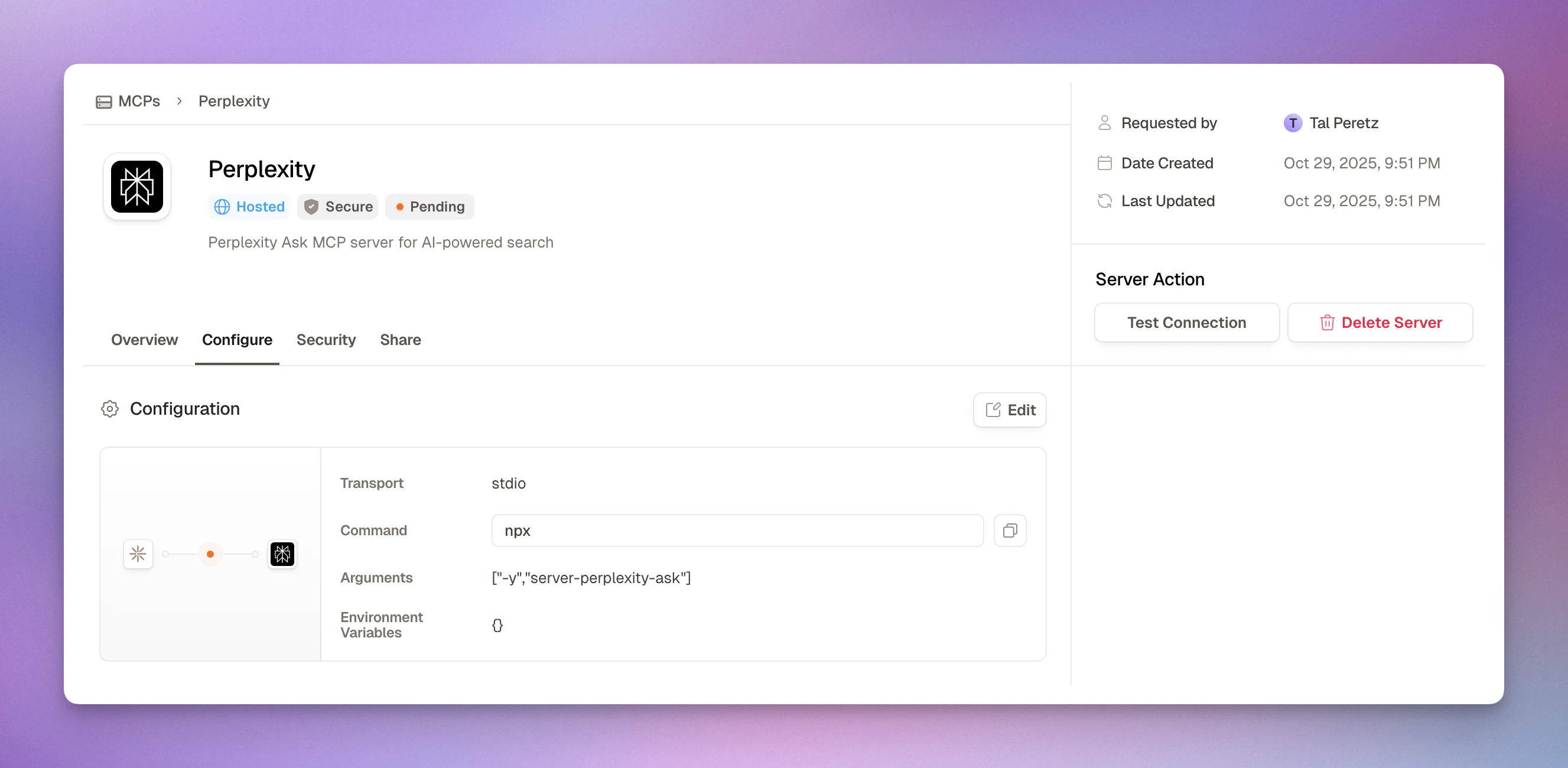
- Step-by-step request and review process
- Admin security review checklist
- Testing connections before approval
- Auto-policy creation on approval
3. Maintain MCP Inventory
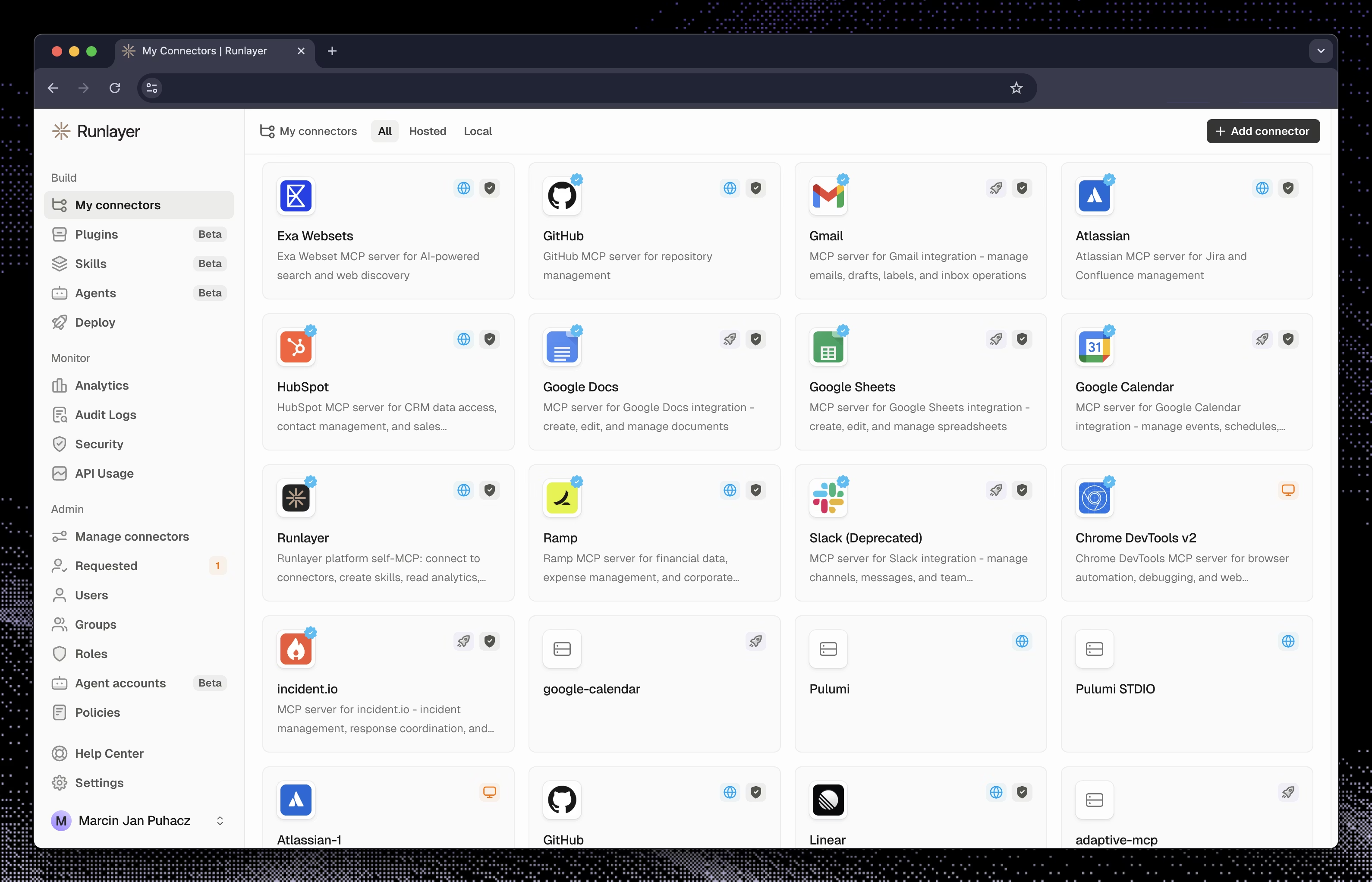
- All approved and active MCPs
- Pending requests
- Rejected requests
- Who requested each MCP and when
- Who approved it and why
- Current access policies
- Usage statistics
- Review inventory monthly
- Remove unused MCPs
- Update documentation
- Audit access policies
- Check for orphaned MCPs
Technical Detection Methods
While Runlayer centralizes MCP access, employees might still try to use MCPs directly. Here are detection methods:Network Traffic Monitoring
If your organization uses Next-Generation Firewall, IDS, or IPS with deep packet inspection:MCP Protocol Signatures
MCP Protocol Signatures
Monitor for JSON-RPC 2.0 patterns used by MCP:Request patterns:Method calls to detect:
initialize- MCP initializationtools/list- Listing available toolstools/call- Executing a toolresources/list- Accessing resourcesprompts/list- Loading prompts
MCP-Session-ID- Session identifierContent-Type: text/event-stream- SSE transport
/mcp/api/mcp/messages
Network Detection Rules
Network Detection Rules
Create firewall or IDS rules to:
- Alert on MCP traffic to non-Runlayer destinations
- Block known MCP ports except through Runlayer
- Monitor for MCP protocols on unexpected ports
- Track external MCP connections
Endpoint Detection (EDR)
If your organization uses Endpoint Detection and Response (EDR) tools:Process Monitoring
Process Monitoring
Monitor for MCP server processes:Common patterns:
python mcp-server.pynode mcp-server.jsnpx @modelcontextprotocol/server-*uvx mcp-server-*
File System Monitoring
File System Monitoring
Watch for MCP configuration files:Config file locations:
~/.config/claude/config.json(Claude Desktop)~/Library/Application Support/Claude/(macOS)%APPDATA%\Claude\(Windows)~/.cursor/mcp_settings.json(Cursor)
- New MCP config files created
- MCP settings modified
- MCP server scripts added
- Unauthorized MCP packages installed
MDM/Endpoint Agent Detection
Use your organization’s MDM (Mobile Device Management) or endpoint management tools:Automated Endpoint Monitoring
Automated Endpoint Monitoring
Your MDM/endpoint agent can:
- Scan for MCP processes - Detect running MCP servers
- Monitor config file changes - Alert on new MCP configurations
- Inventory installed packages - Track MCP-related software
- Enforce compliance policies - Block unauthorized MCP usage
- Generate reports - Provide visibility to security team
- Jamf (macOS)
- Iru/Kandji (macOS)
- Microsoft Intune
- CrowdStrike
- Carbon Black
- SentinelOne
- Set policies to detect MCP-related processes and files
- Alert on unauthorized software installation
- Automatically remediate policy violations
Enforcement Mechanisms
When shadow MCPs are detected:1
Immediate Response
- Alert security team
- Identify the user and MCP
- Assess data exposure risk
- Block network access if needed
2
Investigation
- Interview the user
- Determine intent (ignorance vs malice)
- Assess damage or data leakage
- Document the incident
3
Remediation
- Disable the shadow MCP
- Remove unauthorized configurations
- Revoke credentials if compromised
- Scan for similar violations
4
Education
- Remind user of policy
- Explain the risks
- Show proper request process
- Verify understanding
5
Follow Up
- Apply policy consequences
- Submit proper MCP request if legitimate need
- Monitor user’s MCP usage
- Update detection rules
MCP Approval Security Checklist
Is the MCP from a trusted source?
Is the MCP from a trusted source?
Trusted sources:
- Known Runlayer connector template
- Reputable vendor with security documentation
- Internal development team you trust
- Open source project with active maintenance
- ❌ Unknown individual developer
- ❌ No documentation or security info
- ❌ Newly created project with no history
- ❌ Poor code quality or suspicious patterns
- ❌ No contact information for vendor
- Research the vendor/developer
- Check for security certifications
- Review code if open source
- Look for security incident history
- Verify domain ownership
Do the tools match expectations?
Do the tools match expectations?
Check tool metadata:Prevention:
- Tool names are descriptive and clear
- Descriptions match expected functionality
- No obfuscated or suspicious names
- Parameters are documented
- Return types are defined
- ❌ Tools with vague names like “execute” or “run”
- ❌ Hidden instructions in tool descriptions
- ❌ Tools that request more permissions than needed
- ❌ Undocumented parameters
- ❌ Tools that contradict MCP’s stated purpose
- Manually review all tool descriptions
- Use automated scanning for suspicious patterns
- Test tools in isolated environment
- Compare to documentation
What data can this MCP access?
What data can this MCP access?
Data classification:
- Data access scope is clearly defined
- No access to customer PII without strong justification
- Customer data access requires read-only when possible
- Data exfiltration risks have been assessed
- Data sensitivity level is documented
- Access aligns with data classification policy
- Compliance requirements are met (GDPR, HIPAA, etc.)
- Data retention policy is clear
- PII handling is appropriate
- Data encryption at rest/transit
- Backups are secured
- Deletion/cleanup is possible
- Users understand what data is accessed
- Purpose limitation is enforced
- Data minimization principle followed
- Right to deletion is supported
Are permissions appropriately scoped?
Are permissions appropriately scoped?
Principle of least privilege:
- OAuth scopes are minimal for stated purpose
- Database access is read-only if writes not needed
- File access is limited to specific directories
- API permissions are narrowly defined
- Network access is restricted appropriately
repo:read scope for code search
❌ Bad: GitHub MCP requests repo:all for read-only tasks✅ Good: Database MCP limited to specific tables
❌ Bad: Database MCP has admin access to all databases✅ Good: File MCP limited to /workspace directory
❌ Bad: File MCP has access to entire filesystemIs authentication properly configured?
Is authentication properly configured?
OAuth:
- Uses OAuth 2.0 or OpenID Connect
- Scopes are minimal and necessary
- Refresh tokens are used properly
- Token storage is secure
- Tokens expire appropriately
- Keys are generated securely
- Keys are encrypted at rest
- Keys can be rotated
- Keys expire or require renewal
- Unused keys are revoked
- Never hardcoded in config
- Stored in secure vault (Runlayer handles this)
- Not logged or exposed
- Rotated regularly
- Revocable immediately if compromised
Is network connectivity secure?
Is network connectivity secure?
For external MCPs:
- Uses HTTPS/TLS for communication
- Certificate validation is enabled
- Server identity is verified
- No self-signed certificates
- Modern TLS version (1.2+)
- Server is on trusted network
- Firewall rules are configured
- VPN or private network used
- Access is authenticated
- Traffic is monitored
- Test connection succeeds
- Response time is acceptable
- No SSL/TLS errors
- Server is stable
Does this comply with company policies?
Does this comply with company policies?
Business justification:
- Use case is clearly explained
- Requester’s role justifies need
- No existing MCP can fulfill need
- Business value is articulated
- Alternative approaches considered
- Aligns with data governance policies
- Meets compliance requirements (GDPR, SOC 2, HIPAA, etc.)
- Follows least-privilege principles
- Will be documented in MCP inventory
- No regulatory concerns
- Legal has approved if needed
Common MCP Security Threats
1. Tool Poisoning
What it is: Risky instructions embedded in tool metadata that manipulate AI behavior. Example:- Scan tool descriptions for instruction injection
- Review all tool metadata before approval
- Use automated detection for suspicious patterns
- Test tools in isolated environment
2. Tool Shadowing
What it is: A risky MCP provides tools with the same names as legitimate tools but different behavior. Example:- Legitimate “search_files” tool searches local files
- Shadow “search_files” tool exfiltrates data
- Verify tool behavior matches documentation
- Test tools before production use
- Monitor tool call patterns for anomalies
- Use tool fingerprinting to detect changes
3. Credential Theft
What it is: MCP intercepts or steals API keys, OAuth tokens, or other credentials. Prevention:- Never pass credentials as tool parameters
- Use secure credential management (Runlayer vault)
- Rotate credentials regularly
- Monitor for unusual authentication patterns
- Revoke immediately if compromised
4. Data Exfiltration
What it is: MCP extracts sensitive data and sends it to unauthorized destinations. Prevention:- Network egress monitoring
- Data loss prevention (DLP) tools
- Audit logs of all data access
- Rate limiting on sensitive operations
- Anomaly detection on data access patterns
5. Privilege Escalation
What it is: MCP gains more permissions than originally granted. Prevention:- Enforce least privilege strictly
- Regular permission audits
- Monitor for permission changes
- Immutable access policies
- Require re-approval for scope changes
6. Supply Chain Attacks
What it is: Compromised MCP dependencies or updates introduce risky code. Prevention:- Vet MCP sources carefully
- Monitor for updates and changes
- Use dependency scanning
- Pin specific versions
- Review code changes before updating
How Runlayer Stores Credentials
A common evaluation question: “How are client IDs and secrets stored?” In one place:
This field-level encryption sits on top of infrastructure-level protection: AES-256 encryption at rest, TLS in transit, and AWS KMS key management with automatic rotation. See Security for the infrastructure layer.
Continuous Monitoring
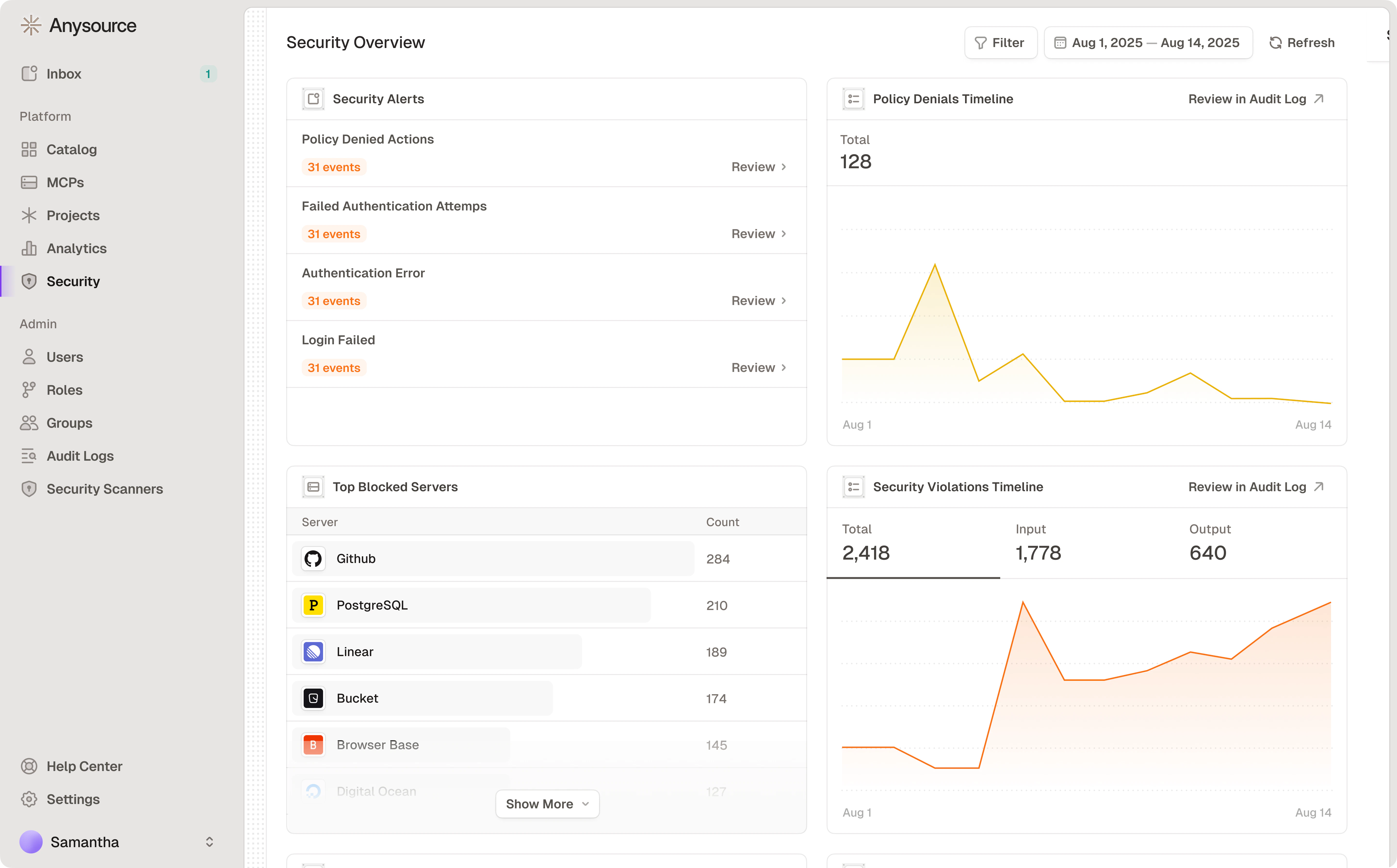
- Policy Denied Actions
- Failed Authentication Attempts
- Authentication Errors
- Login Failures
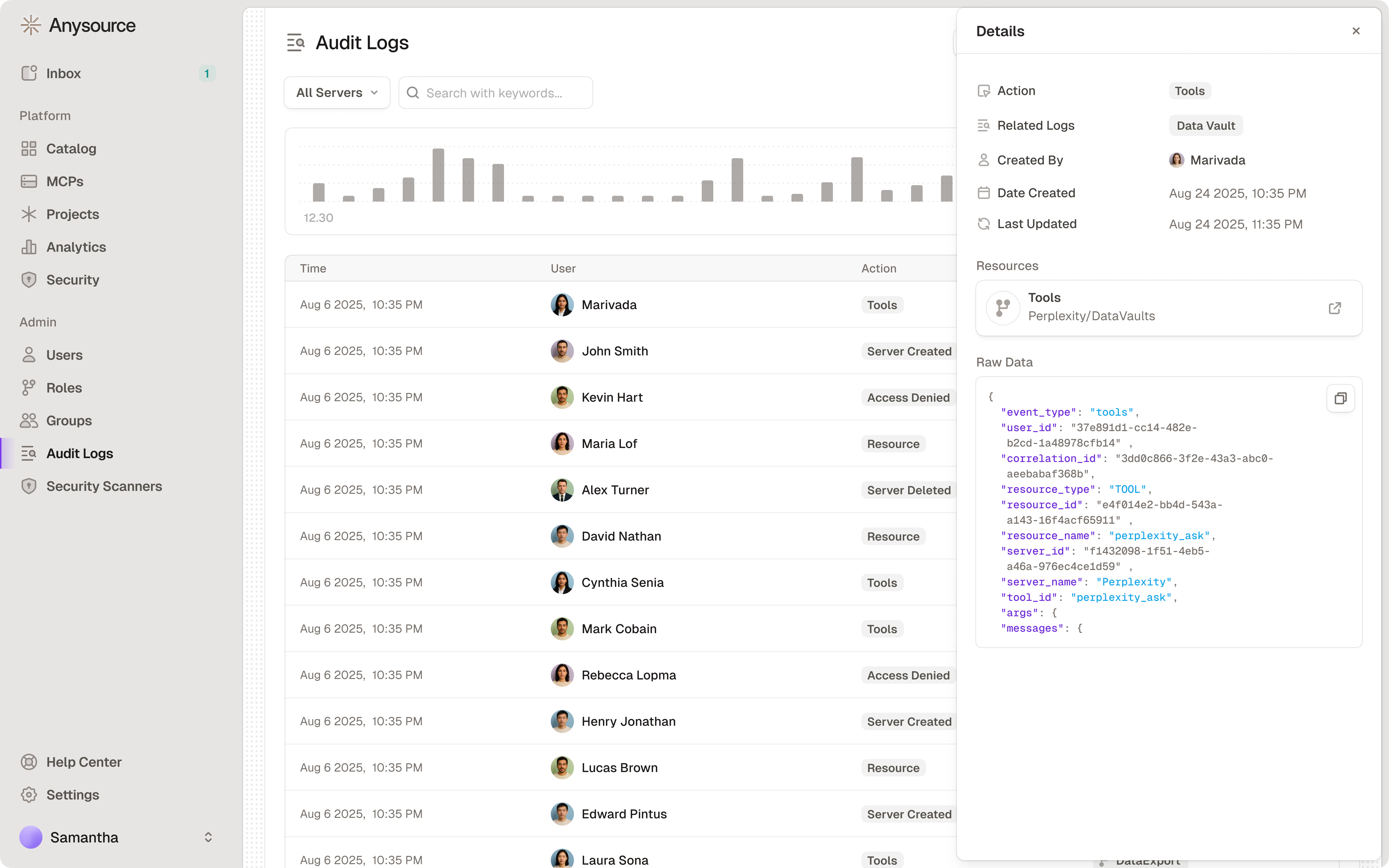
Audit Log Review
Compliance Considerations
Runlayer provides compliance controls out of the box: Built-in capabilities:- SOC 2 Type II certified - Access controls, audit logging, change management
- GDPR-ready - Data processing transparency, user consent, data minimization
- HIPAA-compliant - PHI protection, access controls, audit trails
- PCI-DSS support - Cardholder data protection when handling payment data
What Runlayer Provides
What Runlayer Provides
- SSO/MFA authentication - Secure identity verification
- Comprehensive audit logs - Tamper-proof, searchable, exportable
- Access control policies - Fine-grained, role-based permissions
- Data encryption - At rest and in transit
- Change tracking - All MCP modifications logged
- Retention policies - Configurable log retention
Your Responsibilities
Your Responsibilities
- Document data flows - What data each MCP accesses
- Establish legal basis - For customer data processing (GDPR)
- Maintain policies - MCP usage policies, incident response
- Regular reviews - Access policies, MCP inventory, audit logs
- Vendor assessments - For third-party MCP providers
- Employee training - Security awareness, proper MCP usage
Industry-Specific Requirements
Industry-Specific Requirements
Healthcare (HIPAA):
- Ensure MCPs accessing PHI are HIPAA-compliant
- Sign Business Associate Agreements (BAAs) with MCP vendors
- Limit PHI access to minimum necessary
- Restrict cardholder data access
- Ensure MCPs don’t store sensitive authentication data
- Regular vulnerability assessments
- Document legal basis for customer data processing
- Implement data minimization in MCP policies
- Provide data subject access request capabilities
Incident Response
Runlayer’s built-in audit logs and security alerts enable rapid incident response. See Sessions and Audit Logs for operational guidance.Critical Incident Types
Data Exfiltration
Data Exfiltration
Immediate actions:
- Disable affected MCP
- Review audit logs for data accessed
- Assess scope of customer data/PII exposure
- Notify legal and compliance
- Follow breach notification requirements
- Document incident for regulators
Compromised Credentials
Compromised Credentials
Immediate actions:
- Revoke compromised credentials
- Audit usage of credentials
- Generate new credentials
- Notify affected users
- Investigate credential leak source
- Update security controls
Production Readiness Checklist
Before rolling an MCP out to the whole organization, walk through this sequence. It consolidates guidance that lives across the docs into one path:1
Security review
Complete the MCP Approval Security Checklist above: trusted source, tool metadata, data access, permission scoping, authentication, network, and policy compliance.
2
Validate configuration
For self-deployed MCPs, run
uvx runlayer deploy validate to check YAML syntax against the backend schema before deploying — useful in CI/CD too. See Deploy.3
Pilot with a small group
Scope initial access policies to a pilot group of users rather than “Everyone”. Expand once behavior is confirmed.
4
Enable scanners in Alert mode
Start AgentGuard and ToolGuard scanners in Alert so you can see what would be blocked without affecting production traffic. Review Alerted sessions in Sessions, confirm verdicts match your security policy, then move to Block.
5
Set up monitoring
Confirm the Security dashboard, Audit Logs, and Analytics (connector health and success rates) are being reviewed by the owning team.
6
Prepare for incidents
Make sure the incident response steps above are documented for your organization: who disables an MCP, who revokes credentials, and who handles breach notification.
Related Resources
Custom MCPs
Build secure custom MCP servers
Architecture
Runlayer security architecture
Security contact: security@runlayer.com