

Runlayer Plugin is distinct from Runlayer MCP, the platform self-MCP for
querying audit logs, analytics, and governance. Runlayer Plugin is the unified connector
gateway: it exposes the active, hosted connectors your organization has added, subject to
policy restrictions and your access grants. It does not expose local
connectors, draft or disabled connectors, or tools your policies block.
What Runlayer Plugin Includes
Runlayer Plugin is a special Runlayer plugin that is built dynamically for each user. For each request, Runlayer builds that user’s Runlayer Plugin view from:- active hosted connectors the user can access through policies
- accessible Runlayer skills
- Runlayer platform tools exposed through the Runlayer MCP connector
- local connectors that run on a user’s machine
- draft or disabled connectors as normal executable tools
- connectors blocked by policy for that user
- tools the user could not use through the underlying connector directly
Runlayer Plugin does not grant new permissions. It only exposes capabilities the user
already has through Runlayer, and every tool execution still goes through the
underlying connector’s normal Runlayer controls.
Why teams use it
Runlayer Plugin is useful when your team wants a default, opinionated way to use MCP safely at scale. Without it, users often end up with fragmented client setup, duplicate connectors, inconsistent tool availability, and unclear security boundaries. Runlayer Plugin fixes that by giving the organization a single approved surface for tool discovery and execution. In practice, that means:- admins can standardize the MCP experience across teams
- users get a simpler setup and fewer things to configure
- models get connector tools in the form best suited to their client’s discovery capabilities
- Runlayer policies, approvals, OAuth checks, ToolGuard, and audit logs stay in the loop
Find and connect Runlayer Plugin
Runlayer Plugin appears first in the default Plugins view. You can also reach it:- from the Add to Client flow for a connector or skill. When that connector or skill is included in Runlayer Plugin, Runlayer recommends the plugin before the direct, per-item setup instructions. Click Connect to open Runlayer Plugin with the same client selected.
- from the My connectors or Skills page. Select one or more items and click Add to Client, then choose Use the Runlayer Plugin to connect the organization-wide plugin.
Admin rollout options
Give each supported AI client the same golden path to Runlayer. Enable Auto Sync for Runlayer Plugin, then complete the org install for every client your organization supports. Auto Sync keeps local client connections configured. Each org install adds the client-specific package or routing guidance.Auto Sync
Open the Runlayer Plugin page in Runlayer, click Add to Organization, and enable Auto Sync. This adds Runlayer Plugin to supported local clients, including Cursor. For setup, verification, and MDM deployment, see Automatic Configuration Provisioning.Org Installs
Complete the paths below for the clients your organization uses.Anthropic org install
Install the Runlayer Plugin package through Claude admin plugin settings. The downloadedrunlayer.zip contains:
runlayer/.claude-plugin/plugin.jsonrunlayer/.mcp.jsonrunlayer/skills/runlayer/SKILL.md
1
Download runlayer.zip
In Runlayer, open the Runlayer Plugin page, click Add to Organization, select Anthropic, and click Download zip.
2
Open Claude admin plugin settings
Go to Claude admin plugin settings and click Add plugin.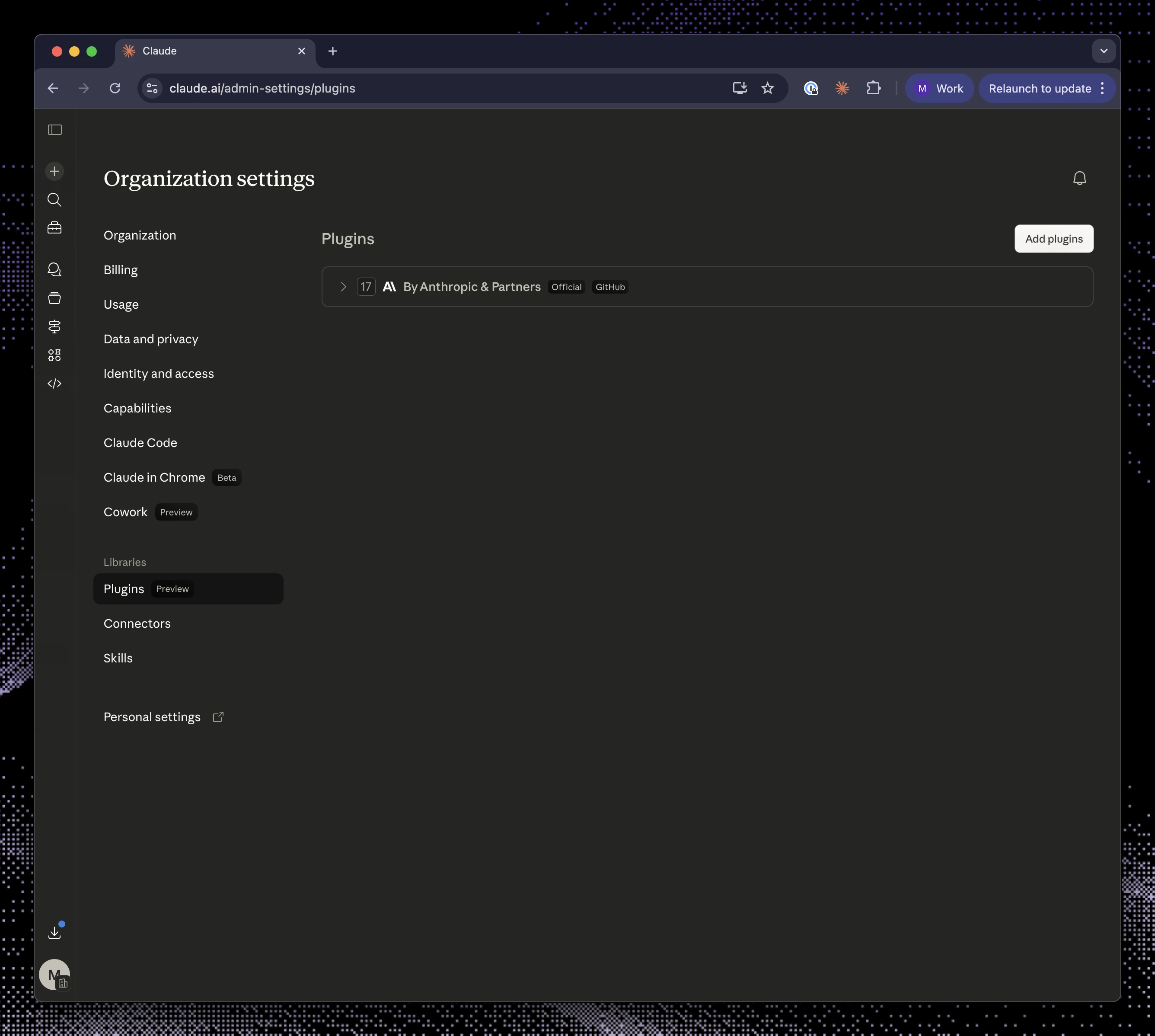
3
Select Upload a file
Choose Upload a file.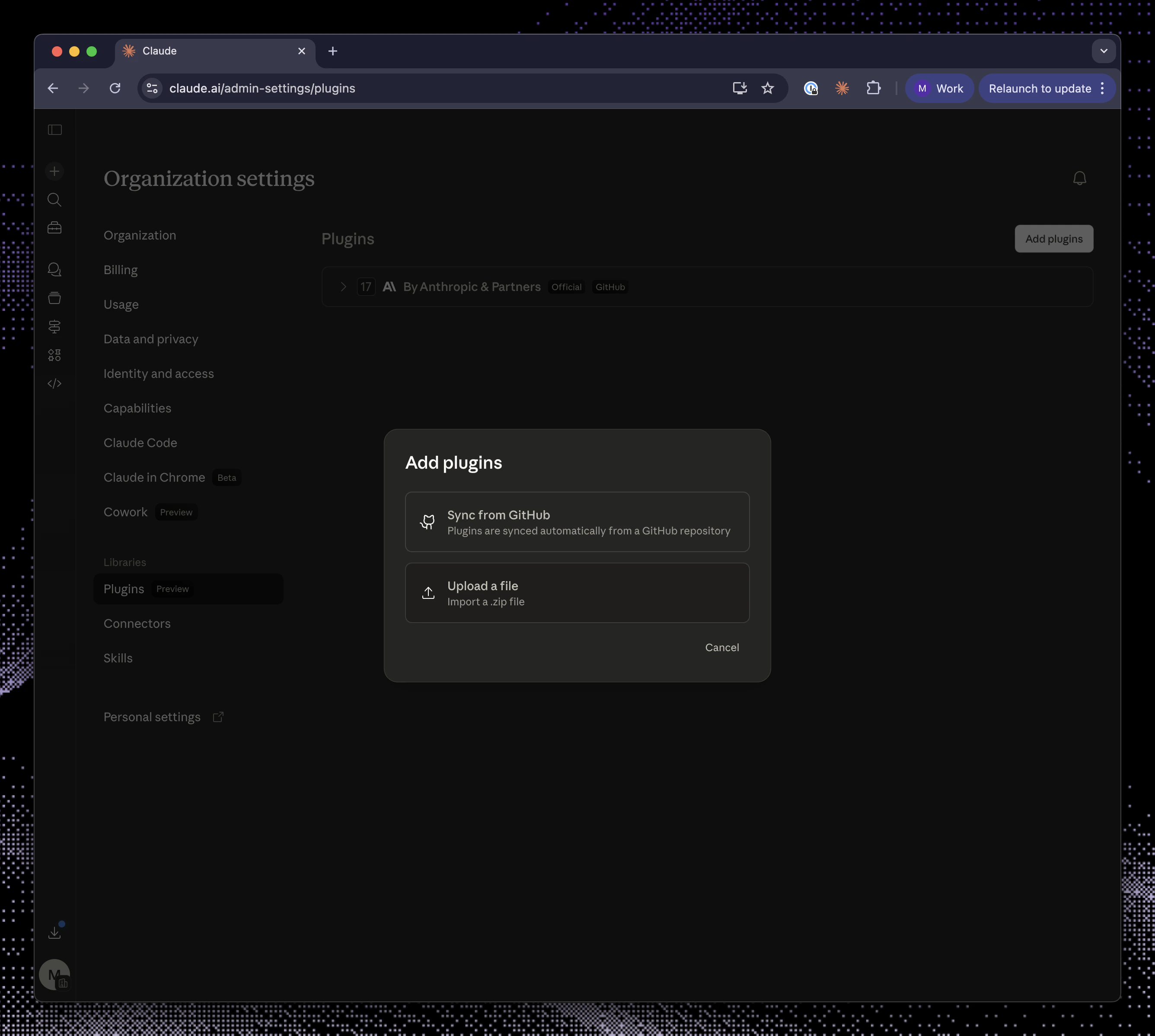
4
Upload the zip
Select 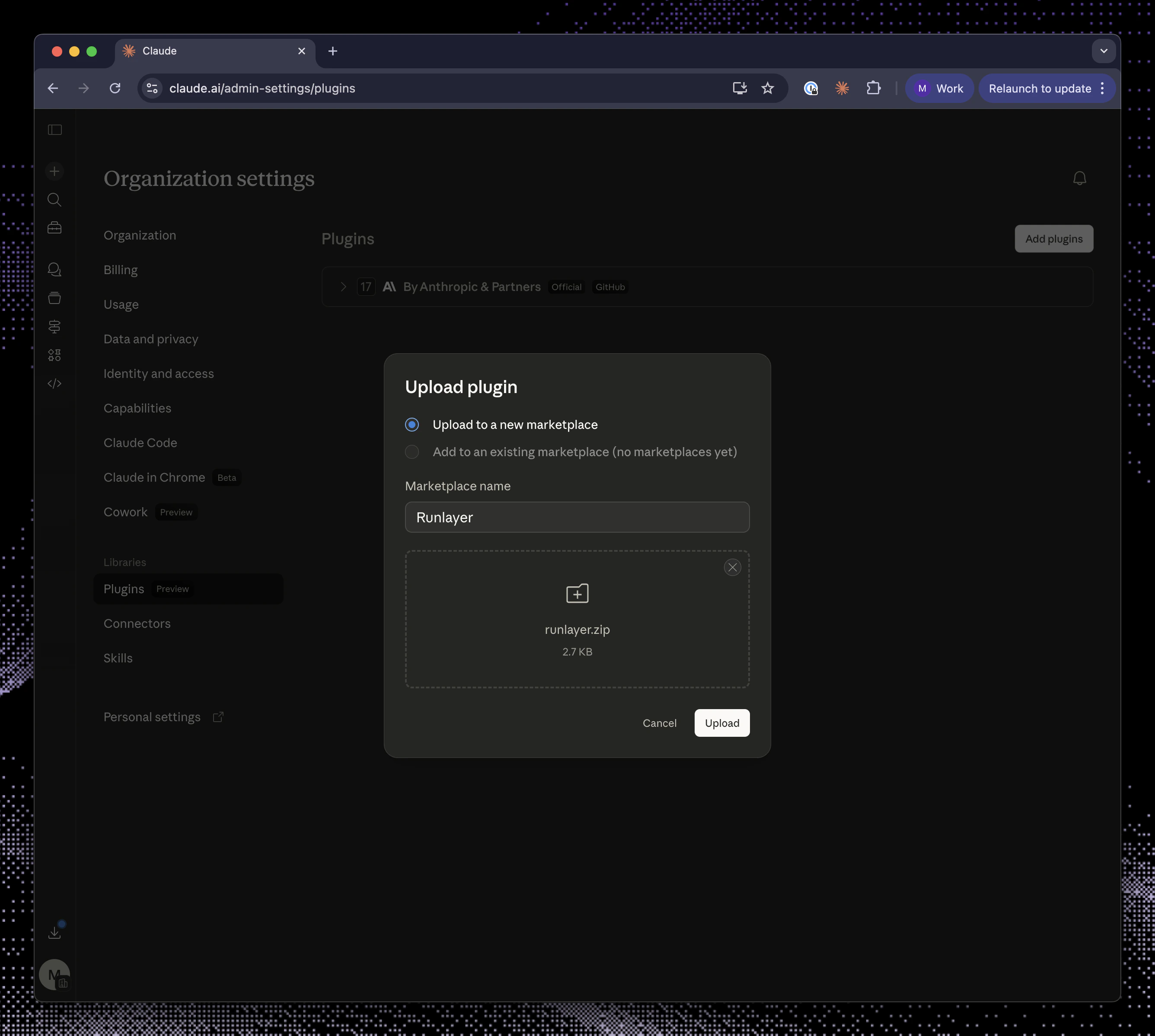
runlayer.zip and click Upload.5
Require access
Change user access to Required.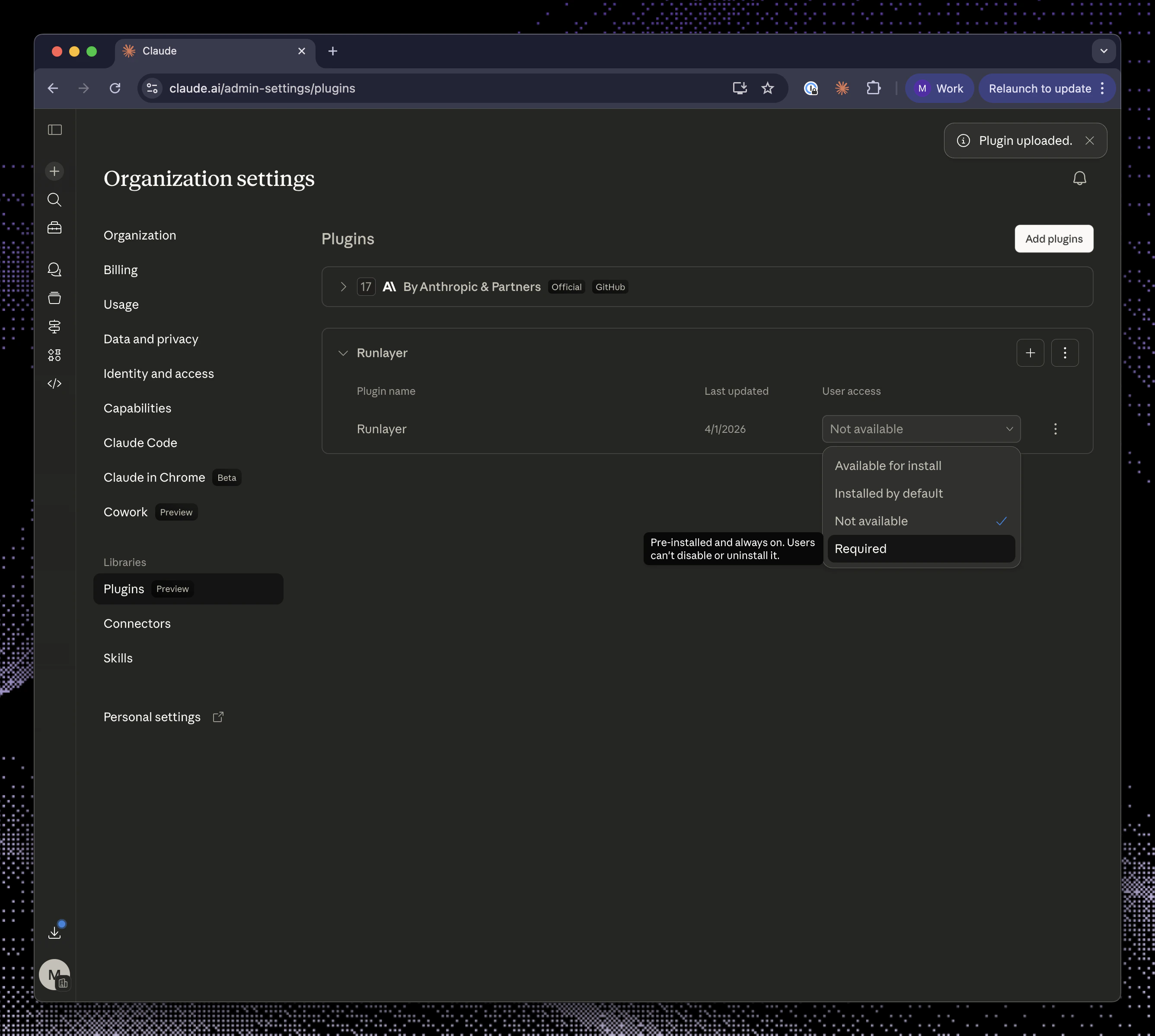
OpenAI org install
Publish Runlayer Plugin and its skill to your ChatGPT organization. The downloadedrunlayer.zip contains:
runlayer/SKILL.mdrunlayer/agents/openai.yamlrunlayer/assets/runlayer-logo.svg
1
Open ChatGPT Admin Connectors settings
Go to ChatGPT Admin Connectors, enable developer mode, and click Create in Apps and Connectors.
2
Create the MCP connector
Use the values shown in the Runlayer dialog:
Complete the OAuth authorization when prompted.
3
Publish the connector
Publish the connector so it is available to your organization.
4
Review risks and configure confirmation
Review potential risks, mark them as reviewed, and configure action confirmation. For read-only actions, select Allow read actions with no user confirmation, then save.
5
Upload the Runlayer skill
Click Download zip in the Runlayer dialog. Go to chatgpt.com/skills, click + New skill, select Upload from your computer, and upload
runlayer.zip.6
Share the skill
Share the skill and set access to Installed for everyone.
Cursor org install
Auto Sync connects Runlayer Plugin in Cursor. Add a companion persistent rule so Cursor Agent stays on the preferred path when native integrations or local CLIs are also available. For organization-wide rollout, create a Team Rule in the Cursor dashboard and enforce it if users should not be able to disable it. For a smaller rollout, add the instructions as a User Rule in Cursor → Customize → Rules or commit an always-applied project rule such as.cursor/rules/runlayer-routing.mdc.
For a project rule, start with:
How connector tools are presented
Runlayer Plugin remains one MCP connection, but it can present connector tools in two forms. Runlayer selects the form automatically based on the client’s discovery capabilities:
Flattened presentation works well for clients that can defer or search a large MCP tool set themselves. Nested presentation keeps the initial tool surface small for clients without those capabilities. The connection, available tools, permissions, and Runlayer controls are the same in both forms.
When flat routing is enabled for your deployment, Runlayer serves flattened connector tools to Claude Web and Desktop, Claude Cowork, ChatGPT Web, Cursor, and VS Code reporting version 1.103 or newer. Supported Claude Code versions and Codex 0.122 or newer with installations reconciled by the Runlayer CLI also receive flattened tools. Older or unreconciled Codex installations, Copilot CLI, older or unrecognized VS Code versions, other Copilot identities, and unsupported clients use nested presentation. Cursor is routed by identity because its SDK can report a generic version rather than the product version. Older clients, disabled native discovery, or unsupported models may still load more tool schemas upfront.
Only connector-tool presentation varies. Dedicated skill tools and agent tools remain directly available in either form.
Custom Plugins with Dynamic tools enabled use
the same routing rules, but only expose their selected tools and linked skills.
They do not inherit the built-in Runlayer Plugin’s platform-tool surface.
Nested connector discovery
Whensearch_tools and execute_tool are available, the connector flow is:
- The model calls
search_toolswith the task it wants to accomplish. - Runlayer Plugin searches across the user’s accessible connectors and returns relevant tool definitions.
- The model calls
execute_toolwith the exact returned tool name and arguments. - Runlayer routes the call to the underlying connector and applies the same policy, security, auth, and audit controls as a direct connector call.
search_tools searches connector tools and Runlayer platform tools that are not
advertised directly. Organization skills and agents never appear in its results;
models should use their dedicated top-level tools instead.search_tools
Use search_tools before execute_tool when Runlayer Plugin presents connector tools in nested form.
Inputs:
Results include the exact tool name, description, source connector name, and input schema.
Example:
execute_tool
Use execute_tool after selecting a tool from search_tools results.
Inputs:
Example:
Skills tools
Runlayer Plugin also exposes dedicated tools for organization skills — reusable instructions, playbooks, SOPs, and checklists. These remain directly available regardless of how connector tools are presented:
The normal flow is
search_skills (or list_skills to browse) → get_skill → get_skill_file. Runlayer Plugin also exposes tools for creating and editing skills when the user has access.
Because search_tools never returns skills, prompts and client instructions that want skills applied should direct the model at the skills tools, not at search_tools.
Agent tools
Runlayer Plugin exposes Runlayer agent tools directly as well. Uselist_agents to find a persistent agent, get_agent to inspect it, and run_agent to delegate work. Agent tools do not go through search_tools or execute_tool.
Skills and /runlayer
Anthropic and OpenAI org-install packages include a Runlayer skill that teaches supported clients how to use Runlayer Plugin. The skill is also available as an optional personal download. Cursor has a companion routing rule. Auto Sync installs only the MCP connection.
New install packages expose the MCP server as runlayer-plugin. Older organization installs may still expose the same server as onelayer; those installs continue to work because the proxy URL and plugin identity are unchanged.
The skill tells the model to:
- use Runlayer Plugin as the default entrypoint for tools, plugins, skills, and agents
- call a directly advertised connector tool when available, or call
search_toolsbeforeexecute_toolwhen nested discovery is available - use
search_skillsorlist_skills, thenget_skillandget_skill_file, for workspace guidance - use
list_agents,get_agent, andrun_agentfor delegation - avoid guessing tool names
- route external tool calls through Runlayer so security policies and audit logs remain in effect
/runlayer skill so users can ask for Runlayer tools and skills without installing separate prompt packages manually.
Permissions and security
Runlayer Plugin keeps the same security model as direct connector usage.- User-scoped results: each user sees only hosted connectors and skills they can access.
- Policy-aware discovery: policy changes affect what appears in Runlayer Plugin on the next request.
- Normal execution path: direct connector tools and
execute_toolboth delegate to the underlying connector proxy, so PBAC, ToolGuard, OAuth/session checks, and audit logging still apply. - OAuth preserved: if a connector needs user authorization, Runlayer Plugin can surface an auth-required tool instead of silently hiding the connector.
- Partial results: if one connector is slow or temporarily unavailable, Runlayer Plugin can still return tools from other available connectors.
User examples
Once Runlayer Plugin is connected, users can ask their AI client for work in normal language. Examples:- “Use Runlayer to find the right GitHub tool and create an issue for this bug.”
- “Search for Slack tools I can use, then summarize messages about the incident.”
- “Use
/runlayerto list available skills for release management.” - “Find the Salesforce tool for reading account details, then look up Acme.”
Troubleshooting
Runlayer Plugin is connected, but no connector tools are available
Runlayer Plugin is connected, but no connector tools are available
The user may not have access to any active hosted connectors. Check connector status and policies for that user. Local connectors are not included in Runlayer Plugin.
A connector I expected is missing
A connector I expected is missing
Runlayer Plugin only includes active hosted connectors visible to the user through policy. Draft, disabled, local, or policy-blocked connectors will not appear as normal executable tools.
Runlayer Plugin asks me to authenticate a connector
Runlayer Plugin asks me to authenticate a connector
The underlying connector requires user OAuth or another user-scoped authorization. Complete the authorization, then search again.
The model guessed a tool name and failed
The model guessed a tool name and failed
Ask it to use an advertised tool name directly or call
search_tools first when
nested discovery is available. Runlayer Plugin tool names must match the names
advertised directly or returned by search results.The model uses search_tools but never finds my skills
The model uses search_tools but never finds my skills
Skills never appear in
search_tools results. Ask the model to call
search_skills (or list_skills to browse), then get_skill, then
get_skill_file. If a skill is still missing, confirm the user has access to it
on the Skills page.One connector is down, but others still appear
One connector is down, but others still appear
Runlayer Plugin is best-effort during discovery. If one connector times out or returns a non-auth error, Runlayer Plugin can still return tools from other available connectors.
Related docs
Plugins
Learn how dynamic tools work for Runlayer plugins.
Policies
Control which users can access each connector and tool.
Audit Logs
Review Runlayer Plugin and connector activity.
Skills
The end-to-end flow from a skill in your repo to Claude and Cursor.