Deploy MCP Watch to macOS devices managed by Jamf Pro.
This guide requires Jamf Pro. Jamf Now and Jamf School have different script deployment capabilities.

Prerequisites

  • Jamf Pro admin access
  • Configured enrollment key from Runlayer (see below)
  • Devices enrolled via User-Approved MDM or Automated Device Enrollment (for Full Disk Access)
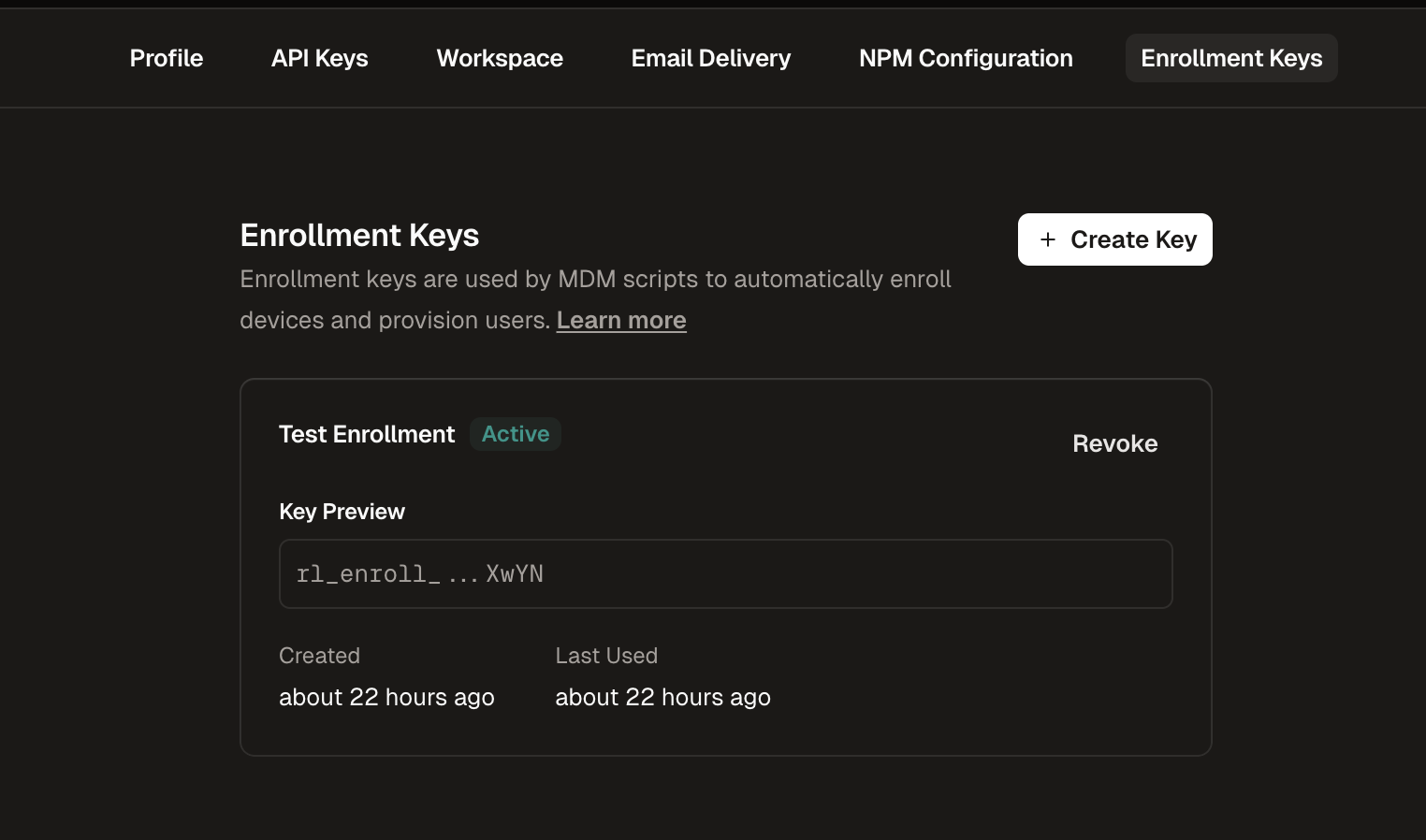
Enrollment keys allow devices to automatically register with Runlayer and obtain API credentials.Enrollment Keys List
1

Navigate to Enrollment Keys

Go to Settings in the Runlayer dashboard and select the Enrollment Keys tab
2

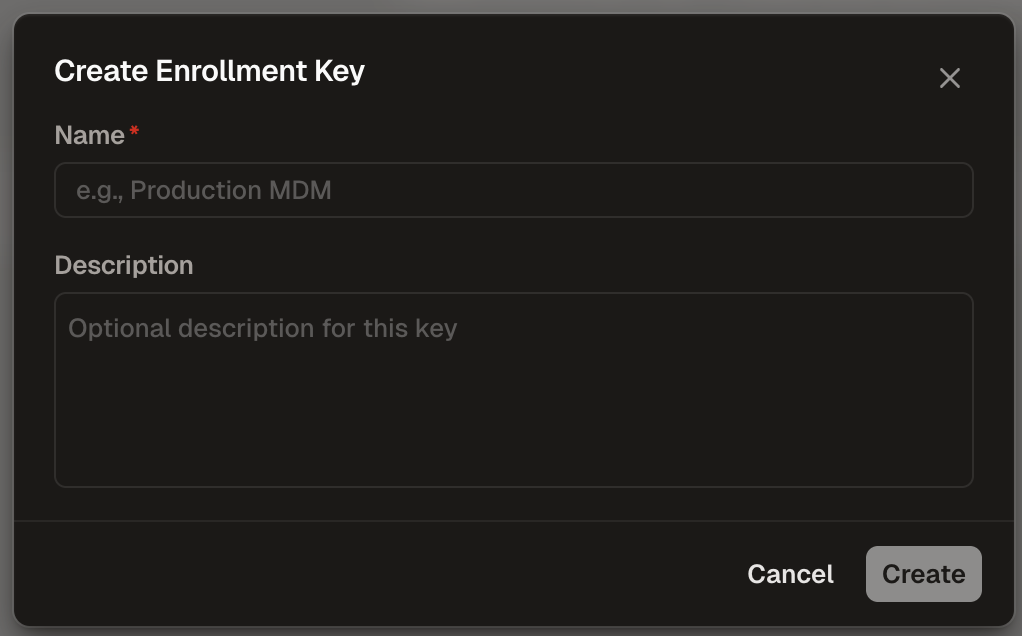
Create a New Key

Click + Create Enrollment KeyCreate Enrollment Key
3

Configure the Key

  • Name (required): Enter a descriptive name (e.g., “Production MDM”)
  • Description (optional): Add context about the key’s purpose
4

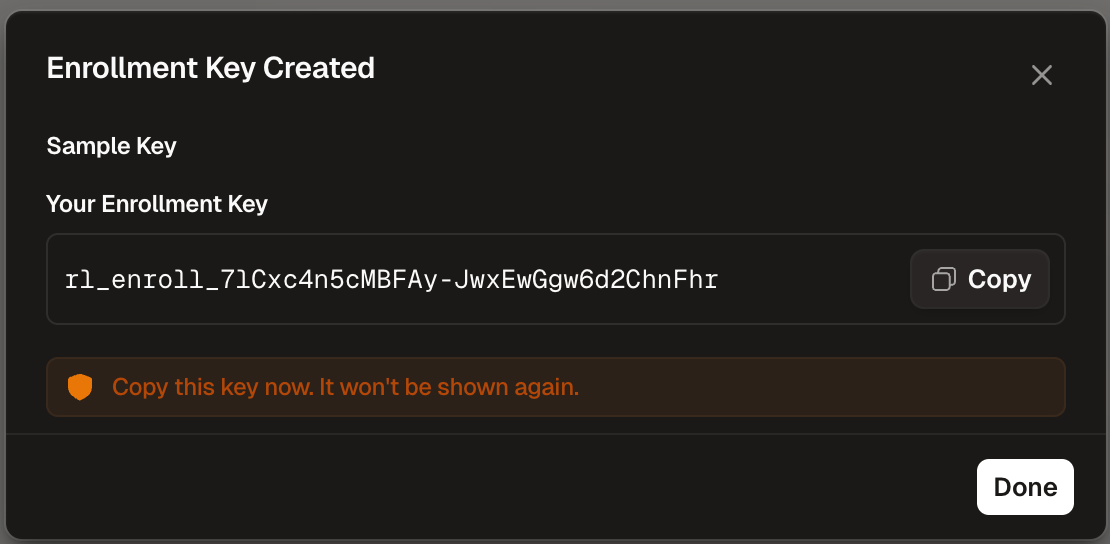
Copy the Key

Copy the generated key (starts with rl_enroll_) and store it securelyEnrollment Key Created
Enrollment keys are shown only once. Store them securely and treat them like passwords.

Deployment Steps

1

Deploy PPPC Profile

The PPPC profile grants Full Disk Access to the Runlayer scan wrapper binary (/usr/local/bin/runlayer-scan). This wrapper is a signed macOS binary that spawns the scan process, which inherits FDA permissions. This scoped approach ensures only Runlayer scans receive FDA, not all uvx executions.
The deployment script embeds the wrapper binary and installs it automatically. You only need to deploy this PPPC profile to grant it Full Disk Access.
Option A: Use Jamf’s Built-in PPPC Configuration
  1. Navigate to Computers > Configuration Profiles
  2. Click New
  3. Give it a name (e.g., “Runlayer MCP Watch - Full Disk Access”)
  4. Under Privacy Preferences Policy Control, click Configure
  5. Add a single entry for the wrapper binary:
    • Identifier: /usr/local/bin/runlayer-scan
    • Identifier Type: Path
    • Code Requirement: identifier "com.runlayer.scan"
    • App or Service: SystemPolicyAllFiles, Access: Allow
    • App or Service: SystemPolicyAppData, Access: Allow
    • App or Service: SystemPolicyMediaLibrary, Access: Allow
    • App or Service: Photos, Access: Allow
    • App or Service: SystemPolicyDesktopFolder, Access: Allow
    • App or Service: SystemPolicyDocumentsFolder, Access: Allow
    • App or Service: SystemPolicyDownloadsFolder, Access: Allow
    • App or Service: SystemPolicyNetworkVolumes, Access: Allow
    • App or Service: SystemPolicyRemovableVolumes, Access: Allow
  6. Scope to target computers/groups
  7. Save and deploy
Option B: Upload Custom ProfileAlternatively, upload the PPPC profile XML as a custom configuration profile:
<?xml version="1.0" encoding="UTF-8"?>
<!DOCTYPE plist PUBLIC "-//Apple//DTD PLIST 1.0//EN" "http://www.apple.com/DTDs/PropertyList-1.0.dtd">
<plist version="1.0">
<dict>
    <key>PayloadContent</key>
    <array>
        <dict>
            <key>PayloadDescription</key>
            <string>Privacy Preferences Policy Control payload for Runlayer MCP Watch</string>
            <key>PayloadDisplayName</key>
            <string>Privacy Preferences Policy Control</string>
            <key>PayloadIdentifier</key>
            <string>com.runlayer.scan.pppc.fda</string>
            <key>PayloadType</key>
            <string>com.apple.TCC.configuration-profile-policy</string>
            <key>PayloadUUID</key>
            <string>A1B2C3D4-E5F6-4A7B-8C9D-0E1F2A3B4C5D</string>
            <key>PayloadVersion</key>
            <integer>1</integer>
            <key>Services</key>
            <dict>
                <key>SystemPolicyAllFiles</key>
                <array>
                    <dict>
                        <key>Authorization</key>
                        <string>Allow</string>
                        <key>CodeRequirement</key>
                        <string>identifier "com.runlayer.scan"</string>
                        <key>Comment</key>
                        <string>Allow Runlayer scan wrapper to access all files for MCP Watch scanning</string>
                        <key>Identifier</key>
                        <string>/usr/local/bin/runlayer-scan</string>
                        <key>IdentifierType</key>
                        <string>path</string>
                        <key>StaticCode</key>
                        <false/>
                    </dict>
                </array>
                <key>SystemPolicyAppData</key>
                <array>
                    <dict>
                        <key>Authorization</key>
                        <string>Allow</string>
                        <key>CodeRequirement</key>
                        <string>identifier "com.runlayer.scan"</string>
                        <key>Comment</key>
                        <string>Allow Runlayer scan wrapper to access app data for MCP Watch scanning</string>
                        <key>Identifier</key>
                        <string>/usr/local/bin/runlayer-scan</string>
                        <key>IdentifierType</key>
                        <string>path</string>
                        <key>StaticCode</key>
                        <false/>
                    </dict>
                </array>
                <key>SystemPolicyMediaLibrary</key>
                <array>
                    <dict>
                        <key>Authorization</key>
                        <string>Allow</string>
                        <key>CodeRequirement</key>
                        <string>identifier "com.runlayer.scan"</string>
                        <key>Comment</key>
                        <string>Allow Runlayer scan wrapper to access Apple Music media library</string>
                        <key>Identifier</key>
                        <string>/usr/local/bin/runlayer-scan</string>
                        <key>IdentifierType</key>
                        <string>path</string>
                        <key>StaticCode</key>
                        <false/>
                    </dict>
                </array>
                <key>Photos</key>
                <array>
                    <dict>
                        <key>Authorization</key>
                        <string>Allow</string>
                        <key>CodeRequirement</key>
                        <string>identifier "com.runlayer.scan"</string>
                        <key>Comment</key>
                        <string>Allow Runlayer scan wrapper to access Photos library</string>
                        <key>Identifier</key>
                        <string>/usr/local/bin/runlayer-scan</string>
                        <key>IdentifierType</key>
                        <string>path</string>
                        <key>StaticCode</key>
                        <false/>
                    </dict>
                </array>
                <key>SystemPolicyDesktopFolder</key>
                <array>
                    <dict>
                        <key>Authorization</key>
                        <string>Allow</string>
                        <key>CodeRequirement</key>
                        <string>identifier "com.runlayer.scan"</string>
                        <key>Comment</key>
                        <string>Allow Runlayer scan wrapper to access Desktop folder</string>
                        <key>Identifier</key>
                        <string>/usr/local/bin/runlayer-scan</string>
                        <key>IdentifierType</key>
                        <string>path</string>
                        <key>StaticCode</key>
                        <false/>
                    </dict>
                </array>
                <key>SystemPolicyDocumentsFolder</key>
                <array>
                    <dict>
                        <key>Authorization</key>
                        <string>Allow</string>
                        <key>CodeRequirement</key>
                        <string>identifier "com.runlayer.scan"</string>
                        <key>Comment</key>
                        <string>Allow Runlayer scan wrapper to access Documents folder</string>
                        <key>Identifier</key>
                        <string>/usr/local/bin/runlayer-scan</string>
                        <key>IdentifierType</key>
                        <string>path</string>
                        <key>StaticCode</key>
                        <false/>
                    </dict>
                </array>
                <key>SystemPolicyDownloadsFolder</key>
                <array>
                    <dict>
                        <key>Authorization</key>
                        <string>Allow</string>
                        <key>CodeRequirement</key>
                        <string>identifier "com.runlayer.scan"</string>
                        <key>Comment</key>
                        <string>Allow Runlayer scan wrapper to access Downloads folder</string>
                        <key>Identifier</key>
                        <string>/usr/local/bin/runlayer-scan</string>
                        <key>IdentifierType</key>
                        <string>path</string>
                        <key>StaticCode</key>
                        <false/>
                    </dict>
                </array>
                <key>SystemPolicyNetworkVolumes</key>
                <array>
                    <dict>
                        <key>Authorization</key>
                        <string>Allow</string>
                        <key>CodeRequirement</key>
                        <string>identifier "com.runlayer.scan"</string>
                        <key>Comment</key>
                        <string>Allow Runlayer scan wrapper to access network volumes</string>
                        <key>Identifier</key>
                        <string>/usr/local/bin/runlayer-scan</string>
                        <key>IdentifierType</key>
                        <string>path</string>
                        <key>StaticCode</key>
                        <false/>
                    </dict>
                </array>
                <key>SystemPolicyRemovableVolumes</key>
                <array>
                    <dict>
                        <key>Authorization</key>
                        <string>Allow</string>
                        <key>CodeRequirement</key>
                        <string>identifier "com.runlayer.scan"</string>
                        <key>Comment</key>
                        <string>Allow Runlayer scan wrapper to access removable volumes</string>
                        <key>Identifier</key>
                        <string>/usr/local/bin/runlayer-scan</string>
                        <key>IdentifierType</key>
                        <string>path</string>
                        <key>StaticCode</key>
                        <false/>
                    </dict>
                </array>
            </dict>
        </dict>
    </array>
    <key>PayloadDescription</key>
    <string>Grants Full Disk Access for Runlayer MCP Watch scanning via the runlayer-scan wrapper binary. This enables scanning of TCC-protected directories (Desktop, Documents, Application Support) without user prompts.</string>
    <key>PayloadDisplayName</key>
    <string>Runlayer MCP Watch - Full Disk Access</string>
    <key>PayloadIdentifier</key>
    <string>com.runlayer.scan.pppc</string>
    <key>PayloadOrganization</key>
    <string>Runlayer</string>
    <key>PayloadRemovalDisallowed</key>
    <false/>
    <key>PayloadScope</key>
    <string>System</string>
    <key>PayloadType</key>
    <string>Configuration</string>
    <key>PayloadUUID</key>
    <string>B2C3D4E5-F6A7-4B8C-9D0E-1F2A3B4C5D6E</string>
    <key>PayloadVersion</key>
    <integer>1</integer>
</dict>
</plist>
2

Generate the Script

Fill in your organization’s settings below to generate a customized deployment script.Jamf-specific configuration tips:
  • ENROLLMENT_USERNAME: Use a Jamf variable or extension attribute that provides the user’s identity. Common variables: $EMAIL, or a custom extension attribute.
  • ENROLLMENT_DEVICE_NAME: Use a Jamf variable or extension attribute that identifies the device. Common variables: $COMPUTERNAME, $SERIALNUMBER, or a custom extension attribute.
3

Upload to Jamf Pro

  • Navigate to Settings > Computer Management > Scripts
  • Click New
  • Enter a display name (e.g., “Runlayer MCP Watch”)
  • Paste the generated script contents
  • Set Priority to “After” (runs after other policies)
  • Save
4

Create a Policy

  • Navigate to Computers > Policies
  • Click New
  • Configure the policy:
    • General: Name it (e.g., “Deploy MCP Watch”)
    • Scripts: Add your uploaded script
    • Scope: Select target computers or groups
    • Trigger: Choose execution trigger:
      • Recurring Check-in: For periodic scans
      • Login: Run when users log in
      • Enrollment Complete: Run on new device enrollment
    • Frequency: Set to Ongoing for repeated execution
5

Save and Deploy

Save the policy to begin deployment to target devices

Verification

1

Verify PPPC Profile

On a target device, verify the profile is installed:
profiles show -type configuration | grep -i runlayer
2

Verify Wrapper Binary

Check that the wrapper binary is installed and signed correctly:
# Check binary exists
ls -la /usr/local/bin/runlayer-scan

# Verify signature
codesign -dv /usr/local/bin/runlayer-scan
3

Check Policy Status

Verify policy execution status in Jamf Pro
4

Verify in Runlayer

Confirm devices appear in Runlayer Analytics > MCP Watch
5

Review Shadow Servers

Review discovered shadow servers and take action as needed

Log Locations

PlatformLog Location
macOS/var/log/mcp-watch.log

Exit Codes

CodeMeaning
0Success
1General failure (missing config, enrollment failed)
2Network failure
3Installation failure